

- Forguncy | 포건시
- 시작하기
- 데이터베이스
- 페이지&데이터바인딩
- 웹페이지 구성
-
명령 및 동작
-
명령
- 페이지 명령 - 페이지 이동
- 페이지 명령 - 팝업 페이지
- 페이지 명령 - 팝업 페이지 닫기
- 페이지 명령 - 메세지 보여주기
- 데이터 명령 - 데이터 테이블 작업
- 데이터 명령 - 리스트뷰 업데이트 명령 만들기
- 데이터 명령 -쿼리
- 데이터 명령 - 정렬
- 데이터 명령 - 데이터 간 이동하기
- 데이터 명령 - 데이터 삭제
- Excel 명령 - 테이블을 Excel로 내보내기
- Excel 명령 - 페이지를 Excel로 내보내기
- Excel명령 - 파일 다운로드 링크 만들기
- Excel명령 - Excel 을 리스트뷰로 가져오기
- 논리 명령 - 조건
- 논리 명령 - 루프 명령
- 논리명령 - 중단명령
- 논리명령 -중지명령
- 셀 명령 - 셀 속성과 내용 변경하기
- 인쇄 명령 - 웹 페이지 인쇄 명령
- 인쇄 명령 - 페이지 PDF로 내보내기
- 알림 명령 - 이메일 알림 설정 생성하기
- 알림 명령 - 메일 보내기 명령
- 프로그래밍 명령 - JavaScript 명령
- 리스트뷰의 열 속성 변경하기
- 재사용 명령
- 행 및 열 레이아웃 설정 명령
- 파라미터 설정
- 저장 프로시저 호출하기
- 셀유형 작동 명령
- 리스트뷰 쿼리 대화 상자 명령
- 런타임 중 언어 전환
- 미 저장 변경사항 알림
- 서버단 명령
- 예약 작업
- 워크플로우
- 로컬 실행 및 디버깅
- 자바 스크립트 프로그래밍
- 다국어
- 재사용 명령
-
명령
- 포건시서버
- 배포 및 권한
- 공동작업
- 플러그인
데이터 명령 - 정렬
정렬 명령을 사용하여 오름차순, 내림차순 또는 토글을 포함하여 테이블의 데이터를 필드 중 하나로 정렬합니다.
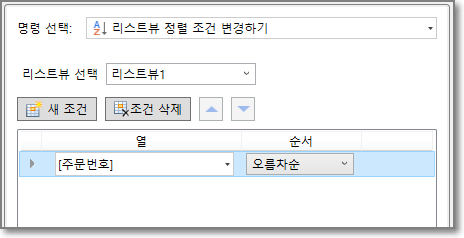
정렬 기준
정렬할 테이블을 선택한 후 새 조건을 클릭하여 정렬 기준을 추가하여 여러 정렬 기준을 추가합니다.
정렬 조건을 선택하고 [조건 삭제]를 클릭하여 삭제합니다. 정렬 기준을 위 또는 아래로 이동하려면 클릭합니다.
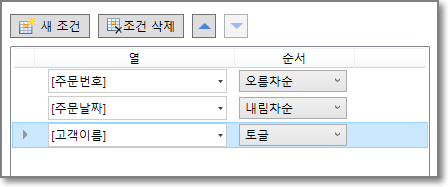
정렬 기준 설정
정렬 조건에서 여러 조건이 추가된 경우 먼저 설정된 조건에 따라 정렬되며, 이 경우 레코드가 순서를 구분할 수 없는 경우에만 설정된 조건을 참조합니다.
| 기준 | 설명 |
|---|---|
| 필드 | 정렬 기준으로 테이블의 필드를 선택합니다. 작성자, 생성 날짜, 마지막 업데이트 및 마지막 업데이트 날짜는 포건시에 의해 자동으로 추가되며 정렬 기준으로 이러한 필드를 선택할 수도 있습니다. |
| 정렬 | 오름차순: 테이블을 필드 오름차순으로 정렬합니다. 내림차순: 테이블을 필드 내림차순으로 정렬합니다. 토글: 사용자가 오름차순 또는 내림차순으로 대체 정렬을 클릭할 수 있습니다. |