

- Forguncy | 포건시
- 시작하기
- 데이터베이스
- 페이지&데이터바인딩
- 웹페이지구성
- 명령및동작
- 배포 및 권한
- 포건시서버
- 공동작업
-
플러그인
- 플러그인 설치하기
-
플러그인 사용하기
- 셀유형 플러그인
-
명령유형 플러그인
- JSON 데이터소스 가져오기(JSONDataSource)
- JSON 직렬화/역직렬화 명령 (JSonUtilityCommand)
- 이미지뷰어 명령(ImageViewerCommand)
- 로딩 표시 시작 (LoadingCommand)
- 셀 위치 설정 명령 (SetCellLocationCommand)
- 현재 행 설정 변경 (SetCurrentRowCommand)
- 리스트뷰로 데이터 전달(PassListviewDataCommand)
- 리스트뷰 새로고침 명령 (ReloadListViewComand)
- CSV 가져오기와 내보내기(ImportExportCSV)
- 워크플로우 명령 (WorkflowCommand)
- 사용자 관리 기능 (UserManagementCommand)
- Post 데이터 명령(SendHTTPRequestCommand)
- 포커스 설정 명령 (SetFocusCommand)
- 서버 파일 관리 (Operate Filescommand)
- 암호화 및 복호화 알고리즘(EncryptDecryptCommand)
- MS 팀즈에 메세지 전송 (TeamsWebHookCommand)
- 운영체제 정보 확인 (DetectOSInfoCommand)
- 대기명령 (SleepCommand)
- Office 365 로그인(Office365LoginCommand)
- 목표값 찾기(GoalSeek) 수식
- 스마트폰 QR코드 스캔 명령
- 추적 프로세스 상태
- 사용자 관리 명령 V2 (UserManagementCommand)
- WebSocket클라이언트 명령
- 데이터베이스 연결 플러그인
- 플러그인 개발하기
MS 팀즈에 메세지 전송 (TeamsWebHookCommand)
이 플러그인을 사용하면 MS 팀즈에 메시지 전송을 할 수 있습니다.
플러그인 다운로드
버전에 맞는 플러그인을 다운로드 합니다.
| 버전 | 다운로드 링크 |
|---|---|
| v 7. 1 | TeamsWebHookCommand.zip |
| v 7. 0 | TeamsWebHookCommand.zip |
| v 6. 1 | TeamsWebHookCommand.zip |
사용 방법
- 플러그인을 다운로드합니다.
- Forguncy Builder에서 설치하고 Forguncy Builder를 다시 실행합니다.
- 팀에서 마우스 오른쪽 메뉴에서 "커넥터"를 클릭합니다.
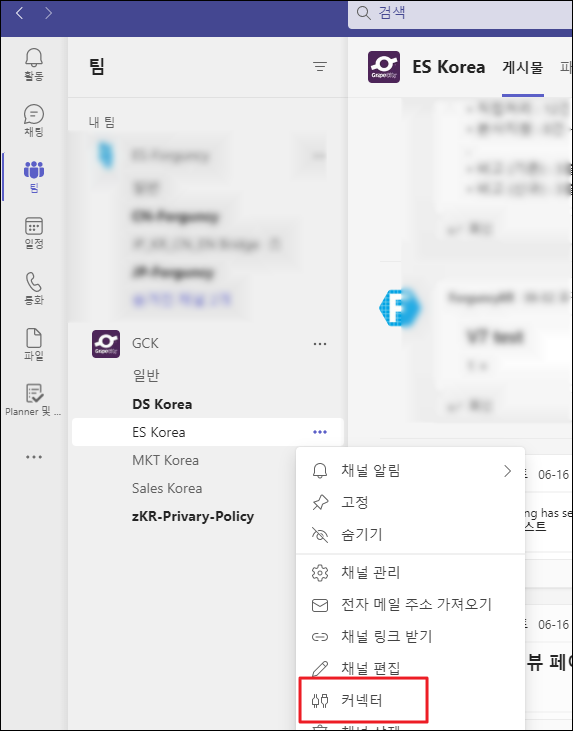
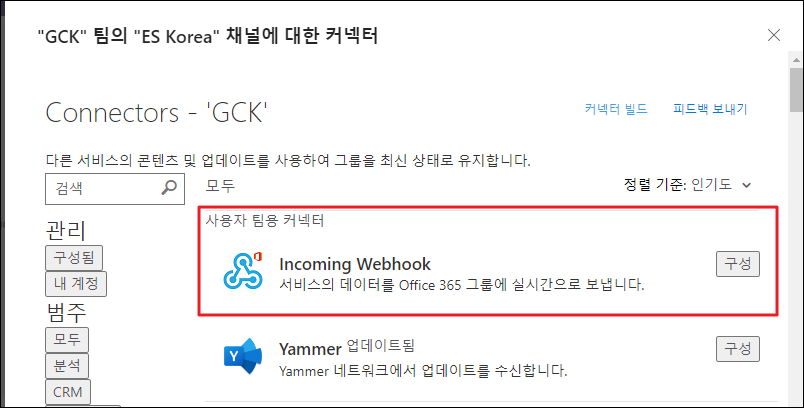
4. Incoming webhook 구성을 클릭합니다.
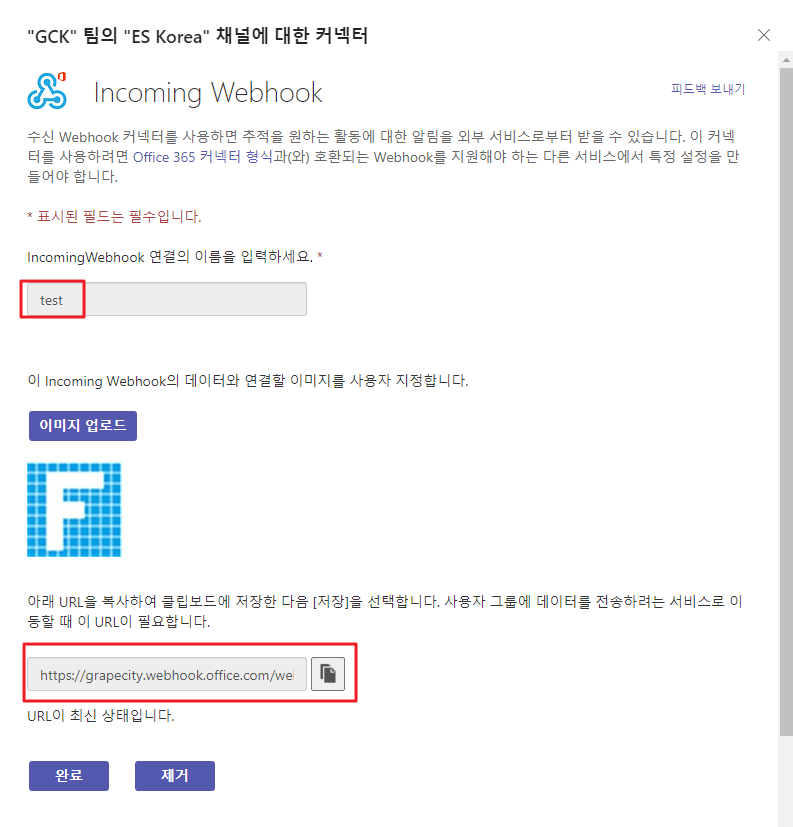
5. IncomingWebhook 연결한 이름을 입력한 후, 만들기를 클릭하면 URL이 나옵니다. 해당 URL을 복사합니다.
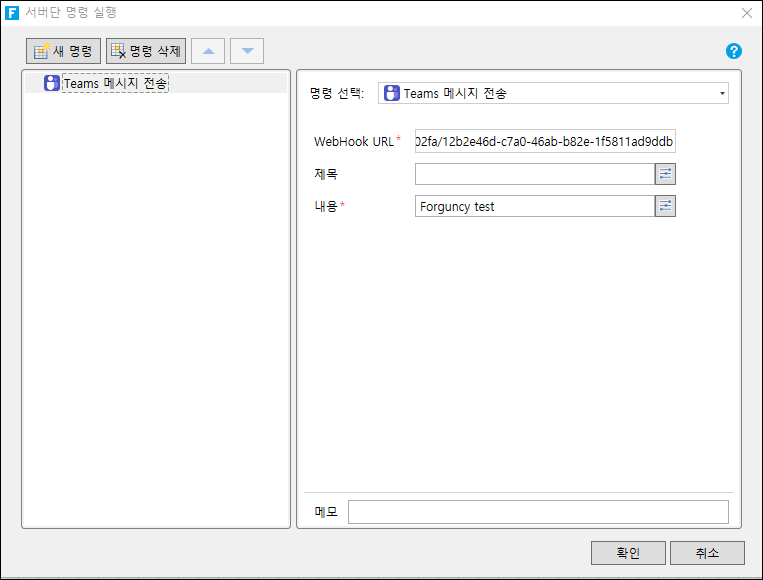
6. 서버단 명령 실행에서 아래와 같이 명령을 설정합니다.
(버튼 명령, 페이지 명령에서도 사용 가능함 )
- 명령 선택 : Teams 메시지 전송
- WebHook URL : 5번에서 복사한 URL
- 내용 : 메시지 내용
7. 해당 명령을 실행하면 아래와 같이 팀즈에 메시지가 보내지는 것을 확인할 수 있습니다.
