# 내장 필드

테이블을 만들면 일부 필드인 기본 제공 필드가 자동으로 생성됩니다.

## 일반 기본 제공 필드&#x20;

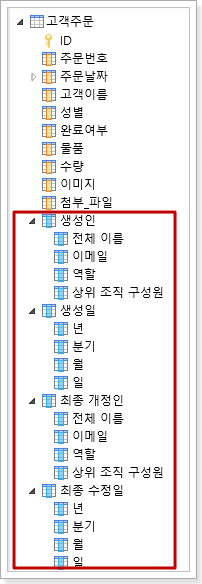
일반 기본 제공 필드에는 그림 과 같이 작성자, 생성 날짜, 마지막 업데이트 날짜 및 마지막 업데이트 날짜가 포함됩니다.

이러한 필드는 수정하거나 삭제할 수 없으며 ID를 제외한 모든 필드는 테이블의 작업 영역에 나타나지 않습니다. 이러한 필드의 값은 표시, 조건부 식 및 워크플로 등에 사용할 수 있습니다.
![](/files/hg6MgGkoScCrGTmAhWrd)

| 필드     | 설명                                                                            |
| ------ | ----------------------------------------------------------------------------- |
| 생성인    | 전체 이름, 메시지, 역할, 조직 상위, 사용정 속성 하위 필드를 포함하여 사용자 유형 필드와 동일한 현재 레코드의 작성자입니다.      |
| 생성일    | 연도, 분기, 월 및 날짜 필드를 포함하여 동일한 날짜 유형 필드와 동일한 날짜로 현재 레코드가 만들어진 날짜입니다.             |
| 최종 개정인 | 전체 이름, 메시지, 역할, 조직 상위, 사용정 속성 하위 필드를 포함하여 사용자 유형 필드와 동일한 현재 레코드의 마지막 업데이트입니다. |
| 최종 수정일 | 연도, 분기, 월 및 일 필드를 포함하여 동일한 날짜 유형 필드와 동일한 현재 사용자의 마지막 업데이트 날짜입니다.              |


---

# Agent Instructions: Querying This Documentation

If you need additional information that is not directly available in this page, you can query the documentation dynamically by asking a question.

Perform an HTTP GET request on the current page URL with the `ask` query parameter:

```
GET https://doc.forguncy.co.kr/v7/database/fieldtype/internal.md?ask=<question>
```

The question should be specific, self-contained, and written in natural language.
The response will contain a direct answer to the question and relevant excerpts and sources from the documentation.

Use this mechanism when the answer is not explicitly present in the current page, you need clarification or additional context, or you want to retrieve related documentation sections.
