# 데이터 보안 설정

응용 프로그램에서 사용하는 데이터베이스의 보안을 설정합니다.

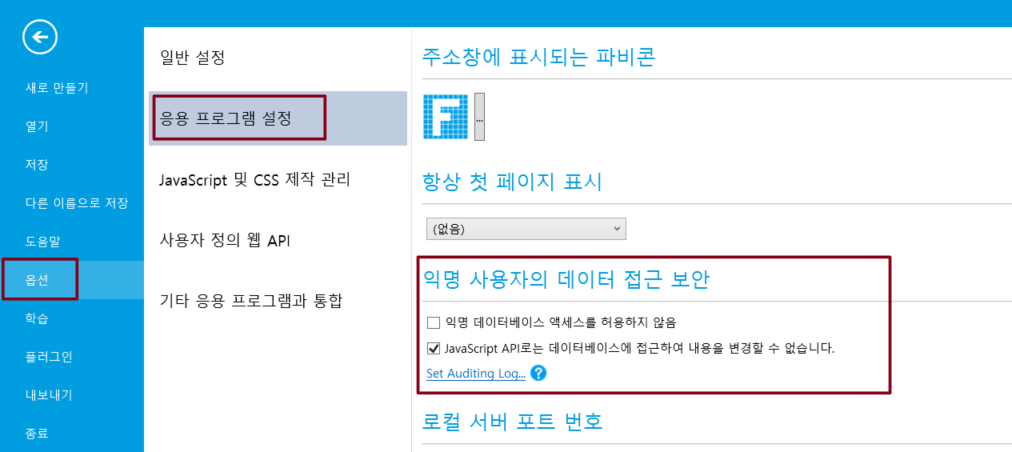
파일-> 옵션-> 응용 프로그램 설정을 선택하고 익명 데이터베이스 엑세스를 허용하지 않음 선택하면 외부 프로그램이 데이터베이스에 직접 액세스하지 못하도록 하여 정보 유출 및 악의적인 데이터베이스 변경을 방지할 수 있습니다.

{% hint style="info" %}
이 속성을 설정하면 데이터 필드 또는 테이블이 있는 페이지에 로그인해야 액세스할 수 있는 사용자 권한 설정의 익명 액세스 설정이 재정의됩니다.
{% endhint %}

![](/files/obHf7LuMWlD3LH6uot5E)


---

# Agent Instructions: Querying This Documentation

If you need additional information that is not directly available in this page, you can query the documentation dynamically by asking a question.

Perform an HTTP GET request on the current page URL with the `ask` query parameter:

```
GET https://doc.forguncy.co.kr/v7/database/externaldb/datasecurity.md?ask=<question>
```

The question should be specific, self-contained, and written in natural language.
The response will contain a direct answer to the question and relevant excerpts and sources from the documentation.

Use this mechanism when the answer is not explicitly present in the current page, you need clarification or additional context, or you want to retrieve related documentation sections.
