# getImageEditorUploadImageFolderPath 메소드

#### ![](https://help.grapecity.com.cn/download/thumbnails/72366344/blue%20block.png?version=1\&modificationDate=1648092746000\&api=v2) 메서드 <a href="#getimageeditoruploadimagefolderpath-fang-fa-fang-fa" id="getimageeditoruploadimagefolderpath-fang-fa-fang-fa"></a>

&#x20;  SpecialPath.getImageEditorUploadImageFolderPath()

#### ![](https://help.grapecity.com.cn/download/thumbnails/72366344/blue%20block.png?version=1\&modificationDate=1648092746000\&api=v2) 설명 <a href="#getimageeditoruploadimagefolderpath-fang-fa-miao-shu" id="getimageeditoruploadimagefolderpath-fang-fa-miao-shu"></a>

이미지  셀 유형을 사용하여 사진을 선택할 때 업로드된 이미지 있는 폴더의 경로를 가져옵니다.

#### ![](https://help.grapecity.com.cn/download/thumbnails/72366344/blue%20block.png?version=1\&modificationDate=1648092746000\&api=v2) **매개 변수** <a href="#getimageeditoruploadimagefolderpath-fang-fa-can-shu-shuo-ming" id="getimageeditoruploadimagefolderpath-fang-fa-can-shu-shuo-ming"></a>

없음&#x20;

#### ![](https://help.grapecity.com.cn/download/thumbnails/72366344/blue%20block.png?version=1\&modificationDate=1648092746000\&api=v2) **반환값**  <a href="#getimageeditoruploadimagefolderpath-fang-fa-fan-hui-zhi" id="getimageeditoruploadimagefolderpath-fang-fa-fan-hui-zhi"></a>

string&#x20;

#### ![](https://help.grapecity.com.cn/download/thumbnails/72366344/blue%20block.png?version=1\&modificationDate=1648092746000\&api=v2) 예제 <a href="#getimageeditoruploadimagefolderpath-fang-fa-shi-li" id="getimageeditoruploadimagefolderpath-fang-fa-shi-li"></a>

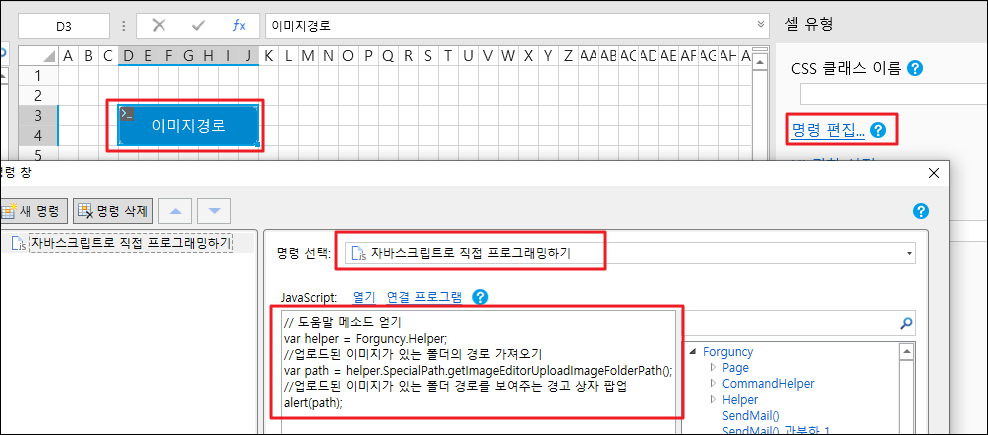
다음 예제 코드에서는 getImageEdiorUploadImageFolderPath 메서드를 사용하여 이미지가 업로드된 폴더의 경로를 가져옵니다.

```
// 도움말 메소드 얻기
var helper = Forguncy.Helper;
//업로드된 이미지가 있는 폴더의 경로 가져오기
var path = helper.SpecialPath.getImageEditorUploadImageFolderPath();
//업로드된 이미지가 있는 폴더 경로를 보여주는 경고 상자 팝업
alert(path);
```

#### ![](https://help.grapecity.com.cn/download/thumbnails/72366344/blue%20block.png?version=1\&modificationDate=1648092746000\&api=v2) 사용 예제 <a href="#getimageeditoruploadimagefolderpath-fang-fa-shi-li" id="getimageeditoruploadimagefolderpath-fang-fa-shi-li"></a>

![](https://help.grapecity.com.cn/download/thumbnails/72366330/%E6%AD%A5%E9%AA%A41.png?version=1\&modificationDate=1648092746000\&api=v2)페이지에서 셀 범위를 선택하고, 셀 유형을 버튼으로 설정하고, 명령을 \[자바스크립트로 직접 프로그래밍하기]으로 편집하고, JavaScript 코드를 입력합니다.&#x20;

<figure><img src="https://1164392614-files.gitbook.io/~/files/v0/b/gitbook-x-prod.appspot.com/o/spaces%2FzxNQdilex6YN3fZKZhGM%2Fuploads%2FUap2eeLVvURnZmEqwmnw%2Fimage.png?alt=media&#x26;token=fe0a820b-7b22-4ed0-800f-627dbe71d3d7" alt=""><figcaption></figcaption></figure>

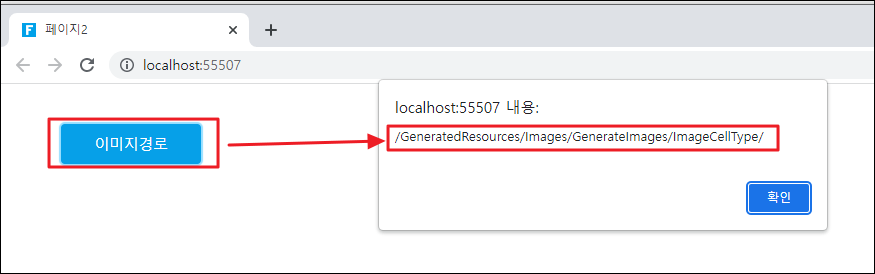
![](https://help.grapecity.com.cn/download/thumbnails/72366344/%E6%AD%A5%E9%AA%A42.png?version=1\&modificationDate=1648092746000\&api=v2)페이지를 실행합니다.버튼을 클릭하면 이미지가 업로드된 폴더의 경로를 보여 주는 경고 상자가 나타납니다.
<figure><img src="https://1164392614-files.gitbook.io/~/files/v0/b/gitbook-x-prod.appspot.com/o/spaces%2FzxNQdilex6YN3fZKZhGM%2Fuploads%2FwOYoKIuBrvIBowcqKELU%2Fimage.png?alt=media&#x26;token=25eab1af-8f66-43fb-882f-51451f955258" alt=""><figcaption></figcaption></figure>