# unbind 메서드

#### ![](https://help.grapecity.com.cn/download/thumbnails/72366255/blue%20block.png?version=1\&modificationDate=1648092742000\&api=v2) 메서드 <a href="#unbind-fang-fa-fang-fa" id="unbind-fang-fa-fang-fa"></a>

&#x20;  Page.unbind(eventType, fn, targetPage)

#### ![](https://help.grapecity.com.cn/download/thumbnails/72366255/blue%20block.png?version=1\&modificationDate=1648092742000\&api=v2) 설명 <a href="#unbind-fang-fa-miao-shu" id="unbind-fang-fa-miao-shu"></a>

특정 이벤트의 바인딩을 해제합니다. 이 메서드는 선택한 이벤트 처리기를 제거하거나 이벤트가 발생할 때 지정된 함수의 실행을 종료할 수 있습니다.

#### ![](https://help.grapecity.com.cn/download/thumbnails/72366255/blue%20block.png?version=1\&modificationDate=1648092742000\&api=v2) **매개 변수** <a href="#unbind-fang-fa-can-shu-shuo-ming" id="unbind-fang-fa-can-shu-shuo-ming"></a>

<table><thead><tr><th width="151">매개변수 </th><th width="156">형식 </th><th width="124">필수여부 </th><th>설명 </th></tr></thead><tbody><tr><td>eventType</td><td>any</td><td>YES</td><td>페이지 이벤트 유형을 나타내는 문자열입니다. 페이지에서 지원되는 이벤트는 <a href="../pageevents">PageEvents 클래</a>스 를 참조하십시오.</td></tr><tr><td>fn</td><td>function</td><td>NO</td><td>이벤트 처리기입니다. 생략하면 해당 이벤트 형식의 페이지에 있는 모든 처리기의 바인딩이 해제됩니다.</td></tr><tr><td>targetPage</td><td>string</td><td>NO</td><td>페이지의 이름입니다. 모든 페이지에 대한 이벤트를 바인딩 해제하는 경우 "*"를 사용합니다. 생략하면 현재 페이지의 이벤트가 바인딩 해제됩니다.</td></tr></tbody></table>

#### ![](https://help.grapecity.com.cn/download/thumbnails/72366255/blue%20block.png?version=1\&modificationDate=1648092742000\&api=v2) **반환값**  <a href="#unbind-fang-fa-fan-hui-zhi" id="unbind-fang-fa-fan-hui-zhi"></a>

없음&#x20;

#### ![](https://help.grapecity.com.cn/download/thumbnails/72366255/blue%20block.png?version=1\&modificationDate=1648092742000\&api=v2) 예제 <a href="#unbind-fang-fa-shi-li" id="unbind-fang-fa-shi-li"></a>

다음 예제 코드에서 unbind 메서드를 사용 하 여 페이지 이벤트에 대 한 바인딩을 제거 합니다.

```
//page1과 page2의 두 페이지가 있는 경우. 현재 페이지는 1페이지입니다.
var eventHandler = function (arg1, arg2) {
    alert(arg2.pageName);
};
// 바인드 이벤트
Forguncy.Page.bind("Loaded", eventHandler);
 
//특정 페이지별 이벤트 핸들러를 바인딩 해제합니다.
Forguncy.Page.unbind("Loaded", eventHandler, "페이1");
 
//현재 페이지별 이벤트 핸들러를 바인딩 해제합니다.
Forguncy.Page.unbind("Loaded", eventHandler);
 
//현재 페이지에서 이벤트의 모든 핸들러 바인딩을 취소합니다.
Forguncy.Page.unbind("Loaded");
 
//바인딩을 해제할 때 "*"를 전달하는 targetPage의 이벤트 핸들러 바인딩
Forguncy.Page.unbind("Loaded", eventHandler, "*");
```

#### Forguncy 사용 예제

※참고 : unbind와 unbindall은 실제 사용하는 방법은 동일하며, 페이지 내 Event Handler의 수가 얼마나 많은 가에 따라 선택적으로 사용하실 수 있습니다. 이에 따라 같은 ‘사용 예제’를 사용합니다.

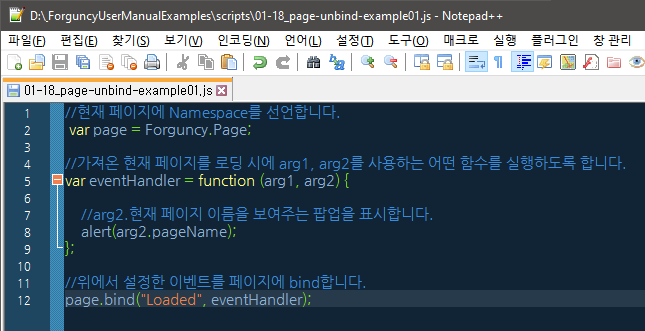
1. 이번 예제에서는 페이지 생성 전에 아래와 같이 2개의 js 파일을 생성합니다.\
   (1) 하나는 이벤트를 페이지 로딩 시점(OnLoad)에 binding 하는 스크립트입니다.<br>

<figure><img src="https://forguncy-korea.github.io/images/forguncy5/ex-ss_page-unbindall01.png" alt=""><figcaption></figcaption></figure>

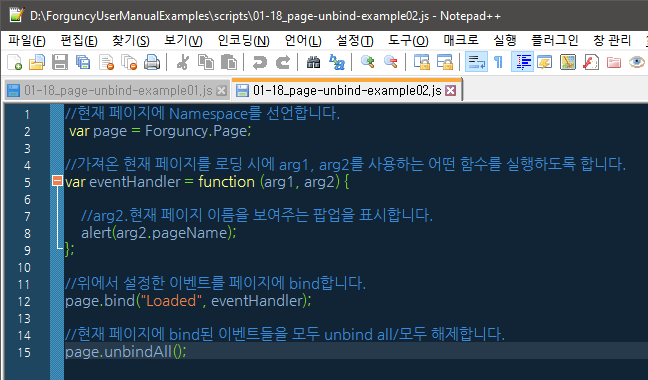
(2) 다른 하나는 같은 코드 내용이지만, 이벤트를 binding함과 동시에 unbinding 하는 스크립트입니다. \ <br>

<figure><img src="https://forguncy-korea.github.io/images/forguncy5/ex-ss_page-unbindall02.png" alt=""><figcaption></figcaption></figure>

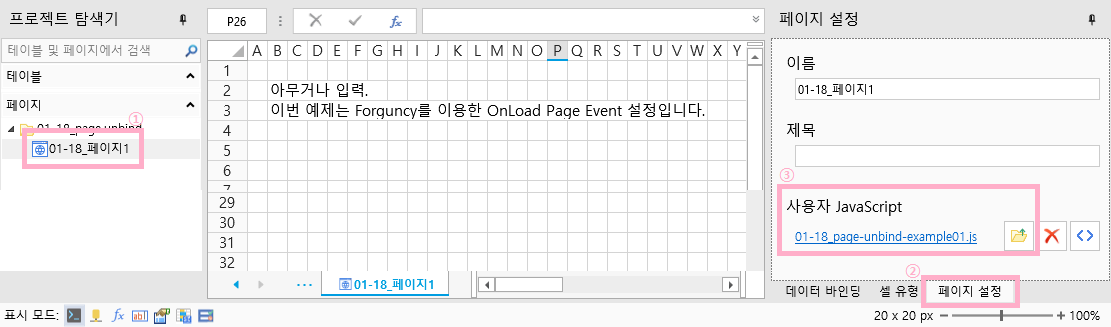
2\. 페이지를 한 개 생성한 후, “페이지 설정” > “사용자 JavaScript”의 폴더 아이콘을 클릭하여 binding한 스크립트를 먼저 가져옵니다.

<figure><img src="https://forguncy-korea.github.io/images/forguncy5/ex-ss_page-unbindall03.png" alt=""><figcaption><p><br></p></figcaption></figure>

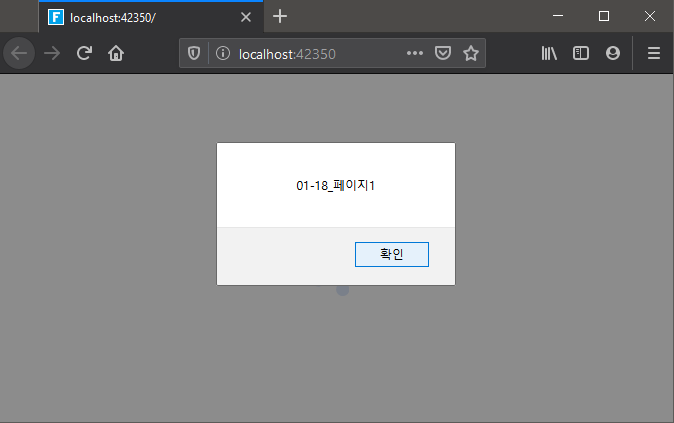
프로젝트를 저장하여 실행하면, 아래와 같이 페이지 이름을 출력하는 팝업창이 나타납니다.

<figure><img src="https://forguncy-korea.github.io/images/forguncy5/ex-ss_page-unbindall04.png" alt=""><figcaption></figcaption></figure>

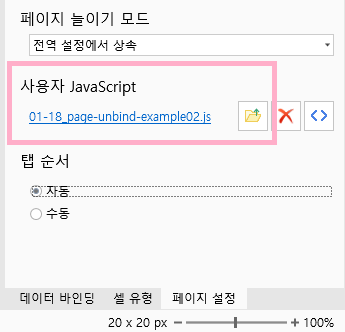
3\. 이번엔 unbinding 하는 스크립트를 가져옵니다.

<br>

<figure><img src="https://forguncy-korea.github.io/images/forguncy5/ex-ss_page-unbindall05.png" alt=""><figcaption></figcaption></figure>

프로젝트를 저장하여 실행하면 팝업창이 나타나지 않고, 해당 페이지가 바로 나타납니다.

![](https://forguncy-korea.github.io/images/forguncy5/ex-ss_page-unbindall06.png)