- Forguncy | 포건시
- 시작하기
- 데이터베이스
- 페이지&데이터바인딩
- 웹페이지구성
-
명령및동작
- 명령
- 서버단 명령
- 예약 작업
- 워크플로우
- 로컬 실행 및 디버깅
-
자바 스크립트 프로그래밍
- CSS 사용하기
- JavaScript 사용
- 작업 페이지
- 작업 셀
- 작업 리스트뷰
- JavaScript 및 CSS 코드 디버그
-
JavaScript API 인덱스
- Forguncy 인터페이스
- Forguncy 매서드
- Forguncy 열거형
-
Forguncy 클래스
- CellEvents클래스
- Cell 클래스
- CommandHelper 클래스
- ForguncyCommandHelper클래스
- ListViewEvents 클래스
- ForguncyHelper 클래스
- ListView 클래스
- PageEvents 클래스
-
Page 클래스
- AutoDisconnectTimeout 메서드
- bind 메서드
- getCellArray 메서드
- getCellByLocation 메서드
- getCell 메서드
- getContainerCells 메서드
- getListViews 메서드
- getListView 메서드
- getMasterPageName 메서드
- getPageName 메서드
- getSubPageInfoByPageID 메서드
- getUserInfo 메서드
- getUserName 메서드
- ready 메서드
- recalc 메서드
- reloadBindingData 메서드
- resumeCalc 메서드
- setCurrentRow 메서드
- suspendCalc 메서드
- unbindAll 메서드
- unbind 메서드
- PivotTableCellType 클래스
- PivotTableEventParameter 클래스
- PivotTableHeaderInfo 클래스
- SpecialPath 클래스
- SubPage 클래스
- Page 변수
- 다국어
- 재사용 명령
- 배포 및 권한
- 포건시서버
- 공동작업
- 플러그인
getMasterPageName 메서드
메서드
Page.getMasterPageName()
설명
현재 페이지의 마스터 페이지 이름을 가져옵니다.
매개 변수
없음
반환값
string
예제
다음 예제 코드에서는 getMasterPageName 메서드를 사용하여 현재 페이지의 마스터 페이지 이름을 가져옵니다. 현재 페이지에 마스터 페이지가 없는 경우 null을 반환합니다.
// 현재 페이지 가져오기
var page = Forguncy.Page;
//현재 페이지의 마스터 페이지 이름 가져오기
var masterPageName = page.getMasterPageName();
//마스터 페이지의 이름을 보여주는 경고 상자 팝업
alert(masterPageName);
사용 예제
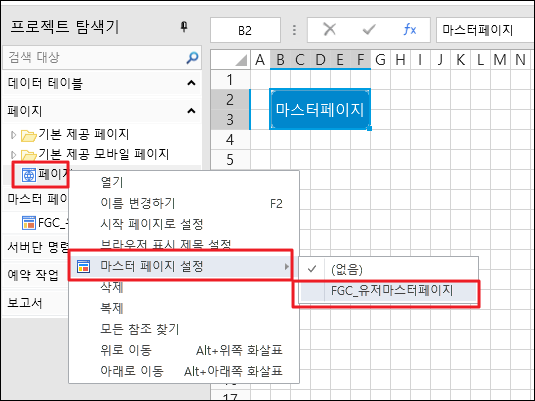
- 페이지를 선택하고 마우스 오른쪽 버튼을 클릭하고 마우스 오른쪽 버튼 클릭 메뉴에서 마스터 페이지 설정을 선택하여 목록에서 마스터 페이지를 선택합니다.
- 해당 페이지에 버튼을 생성하고, “자바스크립트로 직접 프로그래밍하기” 명령으로 코드를 추가합니다.
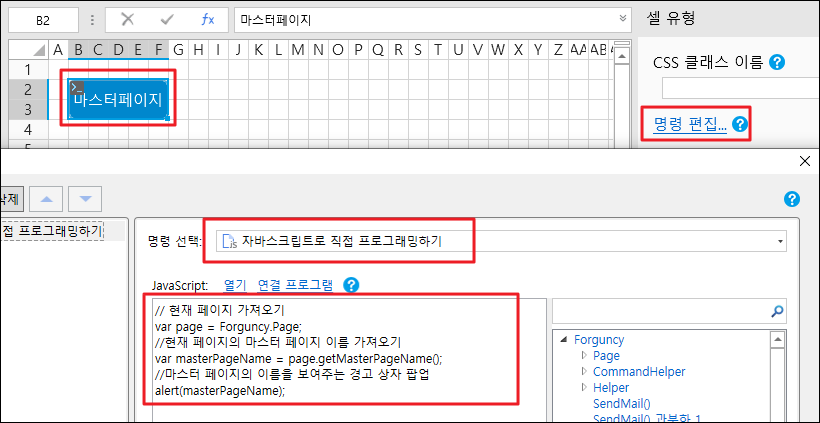
- 편집이 완료되면 [확인]을 클릭하여 대화 상자를 닫습니다.
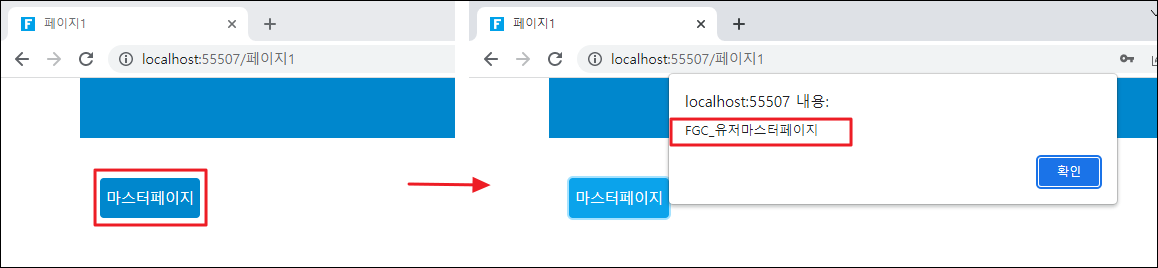
페이지를 실행하고 페이지에서 버튼을 클릭하면 현재 페이지의 마스터 페이지 이름을 표시하는 경고 상자가 나타납니다.