- Forguncy | 포건시
- 시작하기
- 데이터베이스
- 페이지&데이터바인딩
- 웹페이지구성
-
명령및동작
- 명령
- 서버단 명령
- 예약 작업
- 워크플로우
- 로컬 실행 및 디버깅
-
자바 스크립트 프로그래밍
- CSS 사용하기
- JavaScript 사용
- 작업 페이지
- 작업 셀
- 작업 리스트뷰
- JavaScript 및 CSS 코드 디버그
-
JavaScript API 인덱스
- Forguncy 인터페이스
- Forguncy 매서드
- Forguncy 열거형
-
Forguncy 클래스
- CellEvents클래스
- Cell 클래스
- CommandHelper 클래스
- ForguncyCommandHelper클래스
- ListViewEvents 클래스
- ForguncyHelper 클래스
- ListView 클래스
- PageEvents 클래스
-
Page 클래스
- AutoDisconnectTimeout 메서드
- bind 메서드
- getCellArray 메서드
- getCellByLocation 메서드
- getCell 메서드
- getContainerCells 메서드
- getListViews 메서드
- getListView 메서드
- getMasterPageName 메서드
- getPageName 메서드
- getSubPageInfoByPageID 메서드
- getUserInfo 메서드
- getUserName 메서드
- ready 메서드
- recalc 메서드
- reloadBindingData 메서드
- resumeCalc 메서드
- setCurrentRow 메서드
- suspendCalc 메서드
- unbindAll 메서드
- unbind 메서드
- PivotTableCellType 클래스
- PivotTableEventParameter 클래스
- PivotTableHeaderInfo 클래스
- SpecialPath 클래스
- SubPage 클래스
- Page 변수
- 다국어
- 재사용 명령
- 배포 및 권한
- 포건시서버
- 공동작업
- 플러그인
getCellByLocation 메서드
메서드
Page.getCellByLocation(cellLocation)
설명
셀의 위치 정보를 통해 셀 개체를 가져옵니다.
매개 변수
| 매개변수 | 형식 | 위치 |
|---|---|---|
| cellLocation | CellLocationInfo | 셀의 위치 정보입니다. |
CellLocationInfo는 다음과 같이 정의됩니다.
interface CellLocationInfo{
//0부터 시작하는 셀의 행 인덱스
Row: number;
//0부터 시작하는 셀의 열 인덱스
Column: number;
// 셀이 위치한 페이지
PageName: string;
}
반환값
예제
다음 예제 코드에서는 getCellByLocation 메서드를 사용하여 셀 개체를 가져오고 셀 배경색을 설정합니다.
// 현재 페이지 가져오기
var page = Forguncy.Page;
//셀 객체 가져오기
var cell = page.getCellByLocation({
Row: 2,
Column: 3,
PageName: "페이지 1"
});
//셀의 배경색을 빨간색으로 설정
var setColor = cell.setBackColor("red");
Forguncy 사용 예제
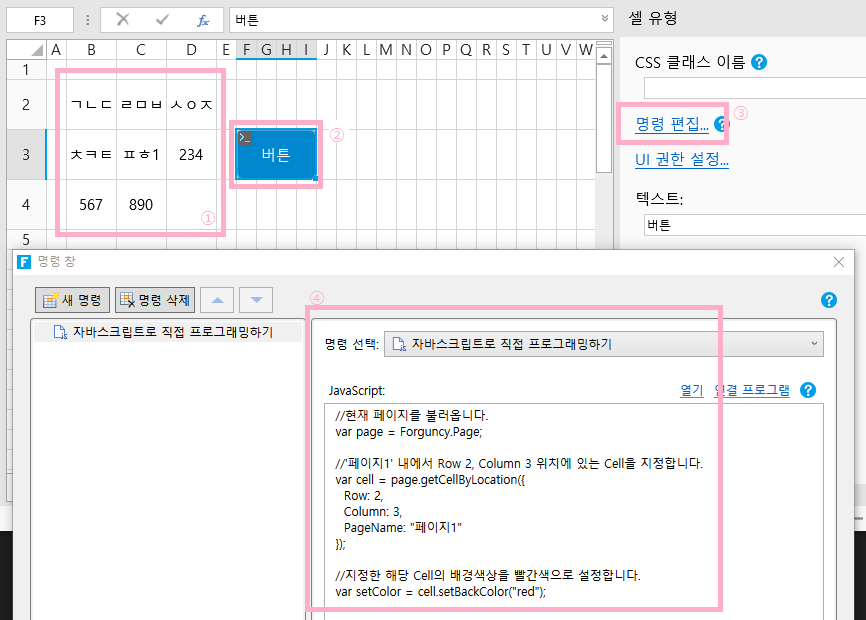
아래 그림 과 같이 Forguncy에서 페이지를 생성하고, 셀의 위치를 알아볼 수 있게 아무 내용이나 입력합니다.
버튼을 생성하고, 해당 바튼의 “명령 편집”을 실행하여, “자바스크립트로 직접 프로그래밍하기” 명령을 생성합니다.
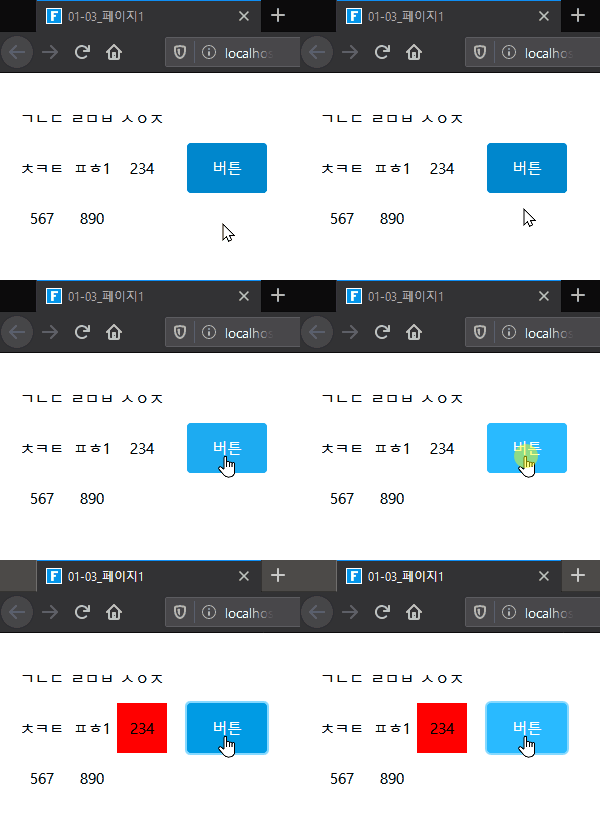
해당 프로젝트를 실행한 후, 버튼을 클릭하면 아래와 같이 Row 2, Column 3 위치에 배경색상이 변경됩니다.
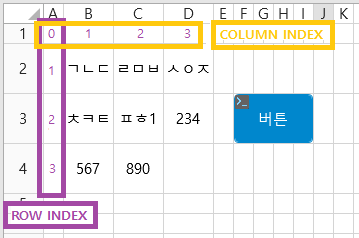
Forguncy에서는 A Column을 0, 1 Row를 0으로 Index 값을 가지며, 이를 기준으로 Cell의 위치를 계산합니다.
그러므로 A1는 Index(0, 0), B2는 Index (1, 1)이 되는 방식입니다. 그러므로 Column 3, Row 2는 D3가 됩니다.