# 현재 행 설정 변경 (SetCurrentRowCommand)

현재 행 설정 변경 플러그인을 사용하여 데이터 테이블의 현재 행 정보를 동적으로 수정할 수 있습니다.&#x20;

### 플러그인 다운로드&#x20;

버전에 맞는 플러그인을 다운로드 합니다.

<table><thead><tr><th width="139">버전 </th><th>다운로드 링크 </th></tr></thead><tbody><tr><td>v10.0</td><td><a href="https://forguncy-korea.github.io/attached_files/Plugin_Files/V10_Plugin/SetCurrentRowCommand.zip">SetCurrentRowCommand.zip</a></td></tr><tr><td>v 9. 0</td><td><a href="https://forguncy-korea.github.io/attached_files/Plugin_Files/V9_Plugin/SetCurrentRowCommand.zip">SetCurrentRowCommand.zip</a></td></tr><tr><td>v 7. 1</td><td><a href="https://forguncy-korea.github.io/attached_files/Plugin_Files/V7.1_Plugin_20211223/SetCurrentRowCommand.zip">SetCurrentRowCommand.zip</a></td></tr><tr><td>v 7. 0</td><td><a href="https://forguncy-korea.github.io/attached_files/Plugin_Files/V7_Plugin_20210722/SetCurrentRowCommand.zip">SetCurrentRowCommand.zip</a></td></tr><tr><td>v 6. 1</td><td><a href="https://forguncy-korea.github.io/attached_files/Plugin_Files/V6.1_Plugin_20201111/SetCurrentRowCommand.zip">SetCurrentRowCommand.zip</a></td></tr><tr><td>v 6. 0</td><td><a href="https://forguncy-korea.github.io/attached_files/Plugin_Files/V6_Plugin_20200903/SetCurrentRowCommand.zip">SetCurrentRowCommand.zip</a></td></tr><tr><td>v 5. 1</td><td><a href="https://forguncy-korea.github.io/attached_files/Plugin_Files/V5_Plugin_20191115/SetCurrentRowCommand.zip">SetCurrentRowCommand.zip</a></td></tr></tbody></table>

### 사용방법&#x20;

1. 플러그인을 다운로드합니다.
2. Forguncy Builder에서 설치하고 Forguncy Builder를 다시 실행합니다.
3. 페이지에 데이터 테이블과 연결된 리스트뷰와 텍스트 상자를 추가합니다.
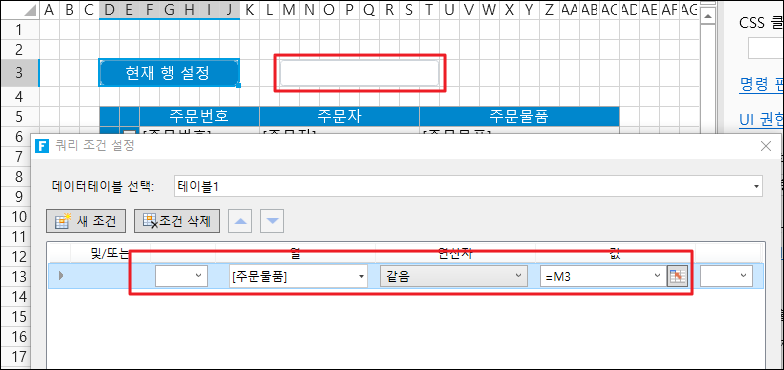
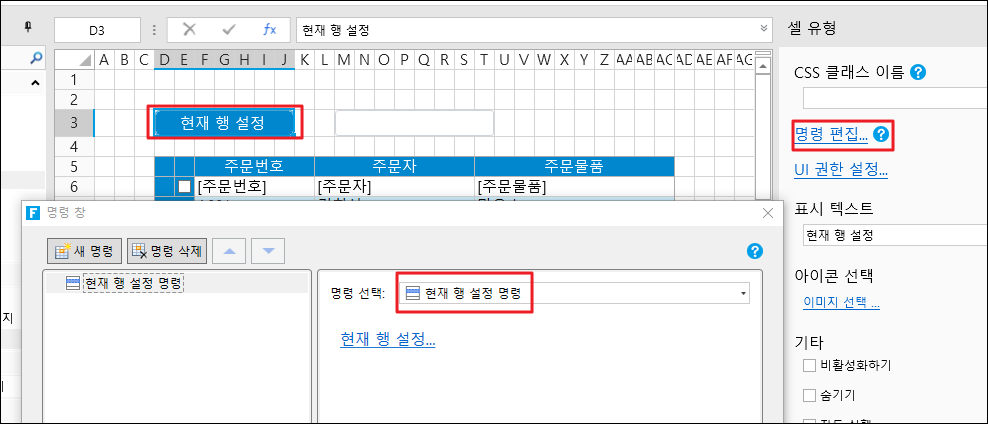
4. 페이지에 버튼을 생성하고, 명령 편집을 아래와 같이 설정합니다.&#x20;

<figure><img src="https://content.gitbook.com/content/kr3K95OpVnkhRrSKF3Qh/blobs/VAnKpJymBQb0RnmfEZu3/image.png" alt=""><figcaption></figcaption></figure>

"현재 행 설정"을 클릭하면 쿼리 조건 설정창이 나타나며, 현재행의 조건을 설정합니다.&#x20;

<figure><img src="https://content.gitbook.com/content/kr3K95OpVnkhRrSKF3Qh/blobs/Pto2BitQZW5VrDFXk3vJ/image.png" alt=""><figcaption></figcaption></figure>

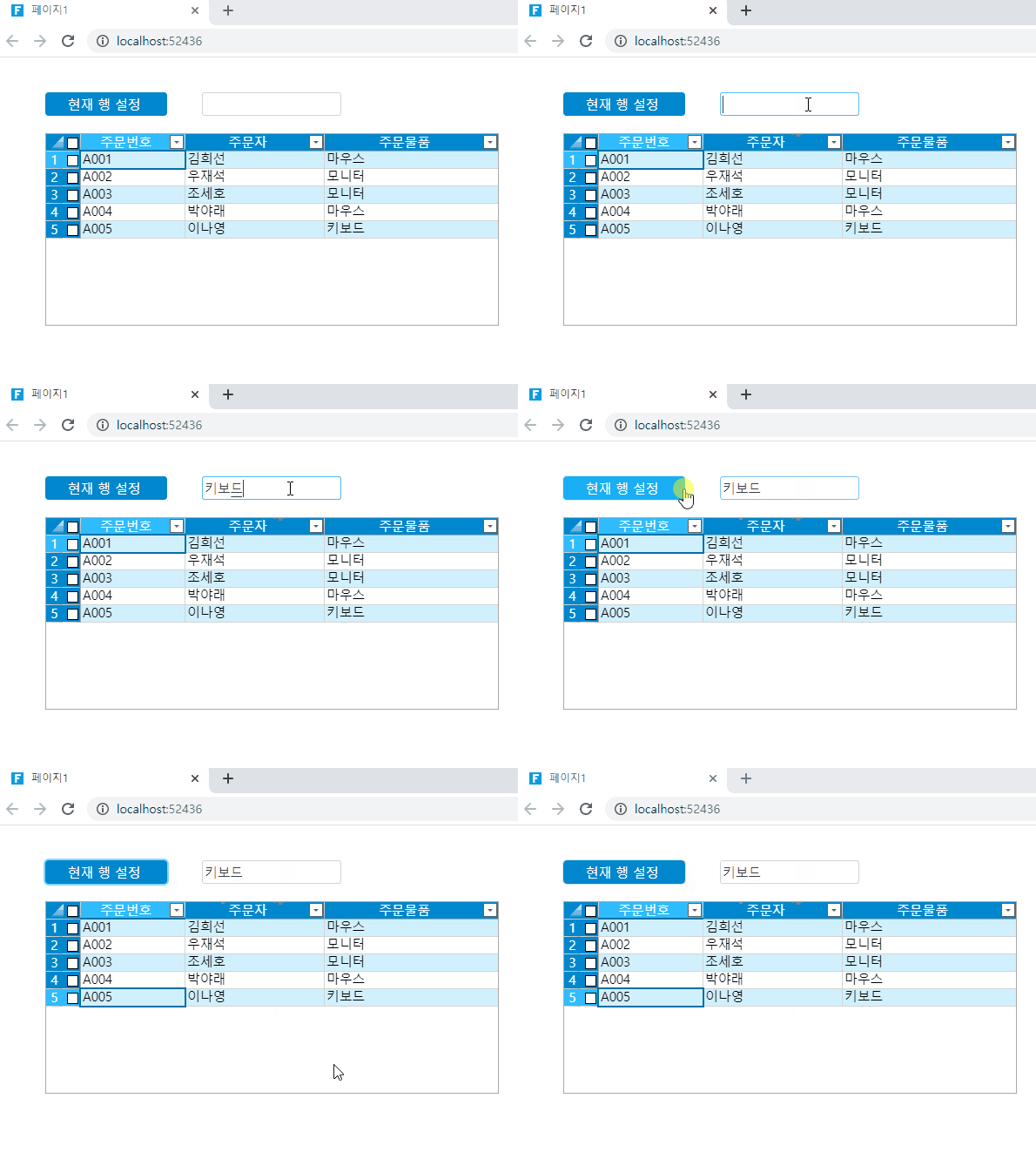
5\. 실행을 한 후, 텍스트 박스에 셀을 입력한 후 "현재 행 설정"버튼을 클릭하면 리스트뷰에서 텍스트박스의 내용이 있는 행으로 이동하는 것을 확인할 수 있습니다.
<figure><img src="https://content.gitbook.com/content/kr3K95OpVnkhRrSKF3Qh/blobs/xcbbySM0eETKmZpiW6rg/picture.gif" alt=""><figcaption></figcaption></figure>