# ListView 선택 항목 표시기(SelectionPanel)

SelectionPanel 플러그인을 사용하여 리스트뷰에서 선택한 항목을 표시할 수 있습니다.

### 플러그인 다운로드&#x20;

버전에 맞는 플러그인을 다운로드합니다.

<table><thead><tr><th width="139">버전 </th><th>다운로드 링크 </th></tr></thead><tbody><tr><td>V10.0</td><td><a href="https://forguncy-korea.github.io/attached_files/Plugin_Files/V10_Plugin/SelectionPanel.zip">SelectionPanel.zip</a></td></tr><tr><td>V 9.0</td><td><a href="https://forguncy-korea.github.io/attached_files/Plugin_Files/V9_Plugin/SelectionPanel.zip">SelectionPanel.zip</a></td></tr><tr><td>v 7. 1</td><td><a href="https://forguncy-korea.github.io/attached_files/Plugin_Files/V7.1_Plugin_20211223/SelectionPanel.zip">SelectionPanel.zip</a></td></tr><tr><td>v 7. 0</td><td><a href="https://forguncy-korea.github.io/attached_files/Plugin_Files/V7_Plugin_20210722/SelectionPanel.zip">SelectionPanel.zip</a></td></tr><tr><td>v 6. 1</td><td><a href="https://forguncy-korea.github.io/attached_files/Plugin_Files/V6.1_Plugin_20201111/SelectionPanel.zip">SelectionPanel.zip</a></td></tr><tr><td>v 6. 0</td><td><a href="https://forguncy-korea.github.io/attached_files/Plugin_Files/V6_Plugin_20200903/SelectionPanel.zip">SelectionPanel.zip</a></td></tr><tr><td>v 5. 1</td><td><a href="https://forguncy-korea.github.io/attached_files/Plugin_Files/V5_Plugin_20191115/SelectionPanel.zip">SelectionPanel.zip</a></td></tr></tbody></table>

### 사용방법&#x20;

1. 플러그인을 다운로드합니다.
2. Forguncy Builder에서 설치하고 Forguncy Builder를 다시 실행합니다.
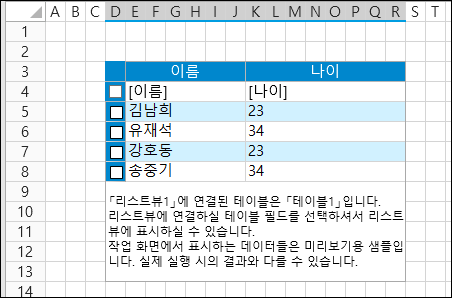
3. 페이지에 리스트뷰를 추가합니다.

<figure><img src="https://content.gitbook.com/content/kr3K95OpVnkhRrSKF3Qh/blobs/i6AmW30a5T0CqaG6Yd4Q/image.png" alt=""><figcaption></figcaption></figure>

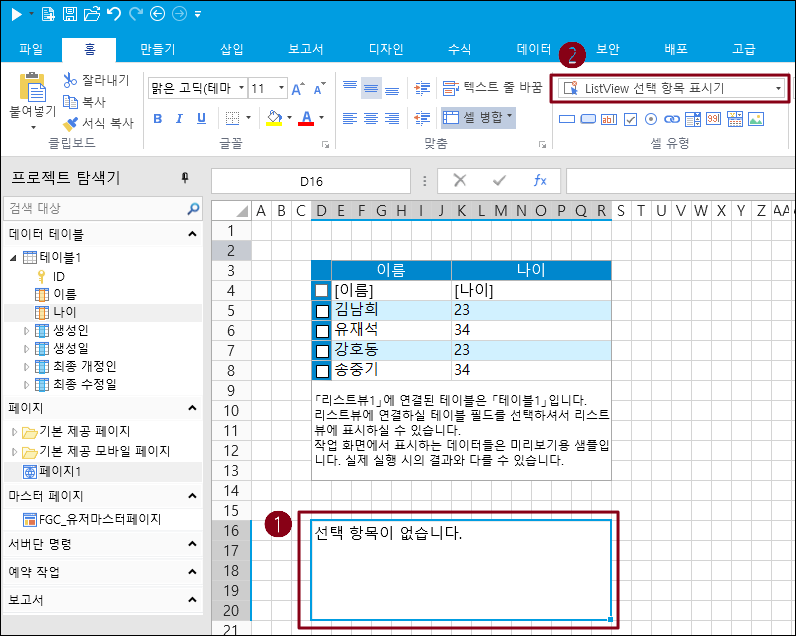
4\. 셀 범위를 선택하고 해당 셀 유형을 ListView 선택 항목 표시기로 설정합니다.
<figure><img src="https://content.gitbook.com/content/kr3K95OpVnkhRrSKF3Qh/blobs/fnRvsVzP7y0rdOfkAF1v/image.png" alt=""><figcaption></figcaption></figure>

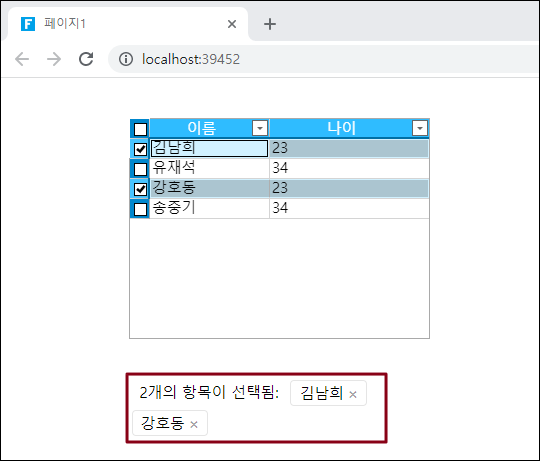
5\. 실행하면 리스트뷰 선택항목이 나오는 것을 확인할 수 있습니다.&#x20;

<figure><img src="https://content.gitbook.com/content/kr3K95OpVnkhRrSKF3Qh/blobs/UClwPzfhdf1djVORfl8z/image.png" alt=""><figcaption></figcaption></figure>