# getCellByLocation 메서드
## Content
#### 메서드
Page.getCellByLocation(cellLocation)
#### 설명
셀의 위치 정보를 통해 셀 개체를 가져옵니다.
#### **매개 변수**
| 매개변수 | 형식 | 위치 |
| --- | --- | --- |
| cellLocation | [CellLocationInfo](/forguncy/docs/command/javascriptprogramming/javascript-api/forguncyinterface/celllocationinfo) | 셀의 위치 정보입니다. |
CellLocationInfo는 다음과 같이 정의됩니다.
```
interface CellLocationInfo{
//0부터 시작하는 셀의 행 인덱스
Row: number;
//0부터 시작하는 셀의 열 인덱스
Column: number;
// 셀이 위치한 페이지
PageName: string;
}
```
#### **반환값**
[Cell](/forguncy/docs/command/javascriptprogramming/javascript-api/class/cellclass)
#### 예제
다음 예제 코드에서는 getCellByLocation 메서드를 사용하여 셀 개체를 가져오고 셀 배경색을 설정합니다.
```
// 현재 페이지 가져오기
var page = Forguncy.Page;
//셀 객체 가져오기
var cell = page.getCellByLocation({
Row: 2,
Column: 3,
PageName: "페이지 1"
});
//셀의 배경색을 빨간색으로 설정
var setColor = cell.setBackColor("red");
```
#### Forguncy 사용 예제
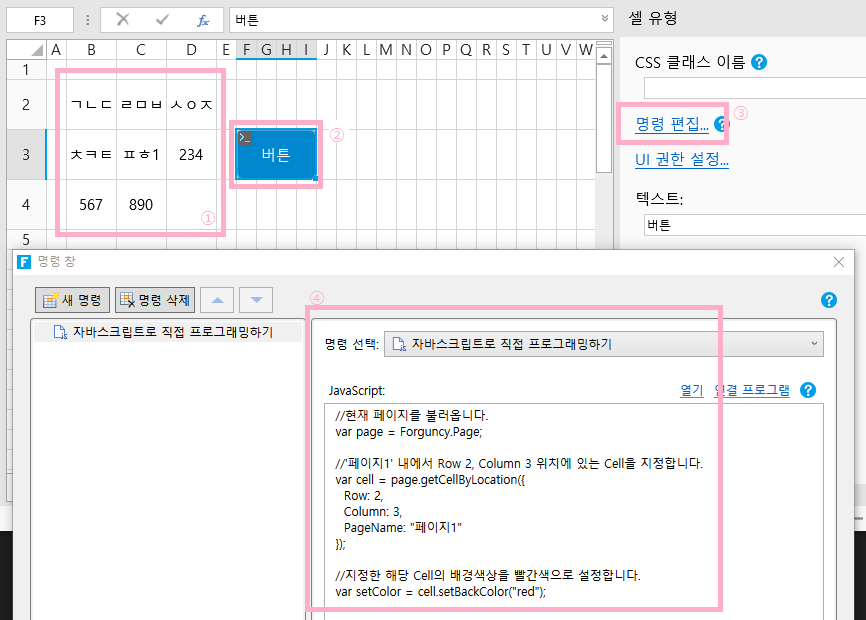
1. 아래 그림 과 같이 Forguncy에서 페이지를 생성하고, 셀의 위치를 알아볼 수 있게 아무 내용이나 입력합니다.
2. 버튼을 생성하고, 해당 바튼의 “명령 편집”을 실행하여, “자바스크립트로 직접 프로그래밍하기” 명령을 생성합니다.
\
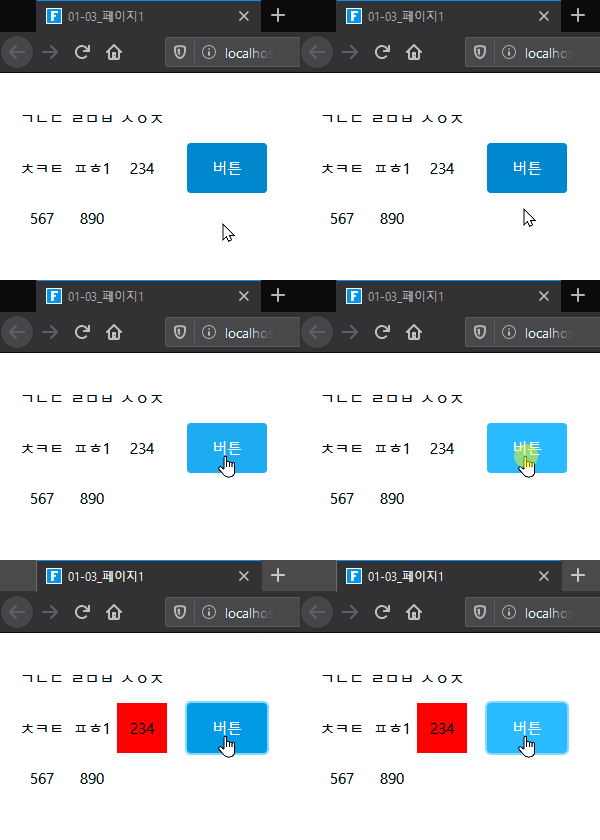
3. 해당 프로젝트를 실행한 후, 버튼을 클릭하면 아래와 같이 Row 2, Column 3 위치에 배경색상이 변경됩니다.
\
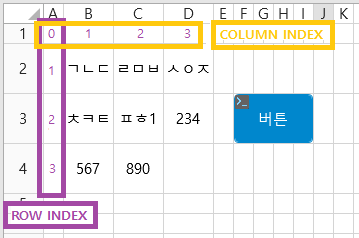
4. Forguncy에서는 A Column을 0, 1 Row를 0으로 Index 값을 가지며, 이를 기준으로 Cell의 위치를 계산합니다.\
그러므로 A1는 Index(0, 0), B2는 Index (1, 1)이 되는 방식입니다. 그러므로 Column 3, Row 2는 D3가 됩니다.