- Forguncy | 포건시
- 시작하기
- 데이터베이스
- 페이지&데이터바인딩
- 웹페이지 구성
- 명령 및 동작
- 포건시서버
- 배포 및 권한
- 공동작업
-
플러그인
- 플러그인 설치하기
-
플러그인 사용하기
- 셀유형 플러그인
-
명령유형 플러그인
- JSON 데이터소스 가져오기(JSONDataSource)
- JSON 직렬화/역직렬화 명령 (JSonUtilityCommand)
- 이미지뷰어 명령(ImageViewerCommand)
- 로딩 표시 시작 (LoadingCommand)
- 셀 위치 설정 명령 (SetCellLocationCommand)
- 현재 행 설정 변경 (SetCurrentRowCommand)
- 리스트뷰로 데이터 전달(PassListviewDataCommand)
- 리스트뷰 새로고침 명령 (ReloadListViewComand)
- CSV 가져오기와 내보내기(ImportExportCSV)
- 워크플로우 명령 (WorkflowCommand)
- 사용자 관리 기능 (UserManagementCommand)
- Post 데이터 명령(SendHTTPRequestCommand)
- 포커스 설정 명령 (SetFocusCommand)
- 서버 파일 관리 (Operate Filescommand)
- 암호화 및 복호화 알고리즘(EncryptDecryptCommand)
- MS 팀즈에 메세지 전송 (TeamsWebHookCommand)
- 대기명령 (SleepCommand)
- 운영체제 정보 확인 (DetectOSInfoCommand)
- 추적 프로세스 상태
- WebSocket클라이언트 명령
- 스마트폰 QR코드 스캔 명령
- Office 365 로그인(Office365LoginCommand)
- 목표값 찾기(GoalSeek) 수식
- 사용자 관리 명령 V2 (UserManagementCommand)
- 데이터베이스 연결 플러그인
- 플러그인 개발하기
현재 행 설정 변경 (SetCurrentRowCommand)
현재 행 설정 변경 플러그인을 사용하여 데이터 테이블의 현재 행 정보를 동적으로 수정할 수 있습니다.
플러그인 다운로드
버전에 맞는 플러그인을 다운로드 합니다.
| 버전 | 다운로드 링크 |
|---|---|
| v 9. 0 | SetCurrentRowCommand.zip |
| v 7. 1 | SetCurrentRowCommand.zip |
| v 7. 0 | SetCurrentRowCommand.zip |
| v 6. 1 | SetCurrentRowCommand.zip |
| v 6. 0 | SetCurrentRowCommand.zip |
| v 5. 1 | SetCurrentRowCommand.zip |
사용방법
- 플러그인을 다운로드합니다.
- Forguncy Builder에서 설치하고 Forguncy Builder를 다시 실행합니다.
- 페이지에 데이터 테이블과 연결된 리스트뷰와 텍스트 상자를 추가합니다.
- 페이지에 버튼을 생성하고, 명령 편집을 아래와 같이 설정합니다.
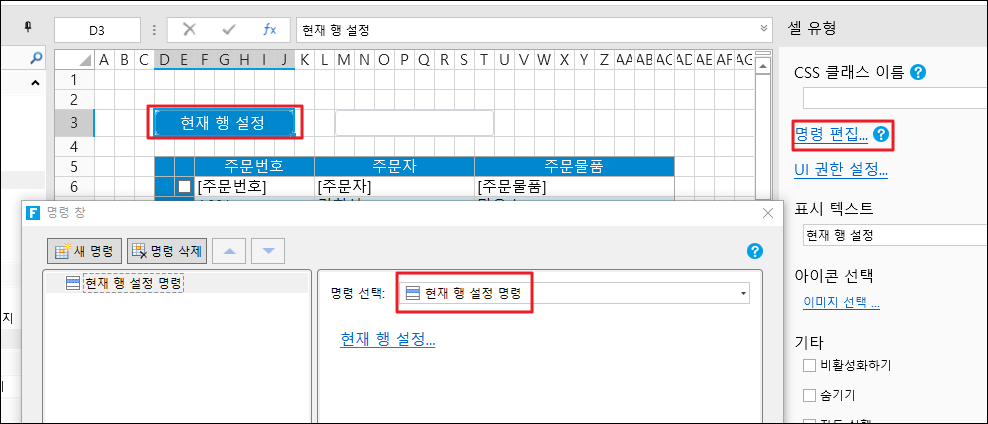
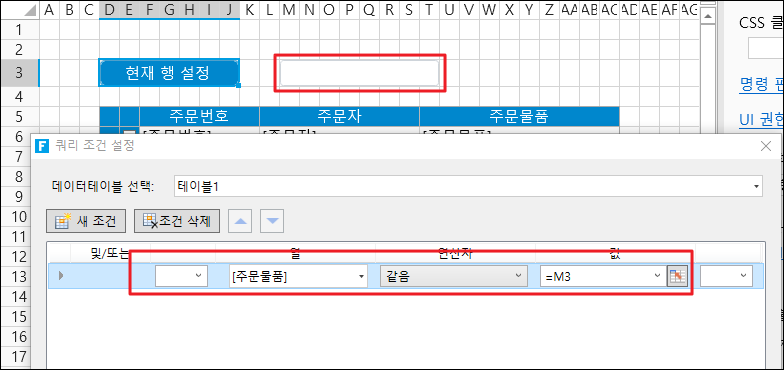
"현재 행 설정"을 클릭하면 쿼리 조건 설정창이 나타나며, 현재행의 조건을 설정합니다.
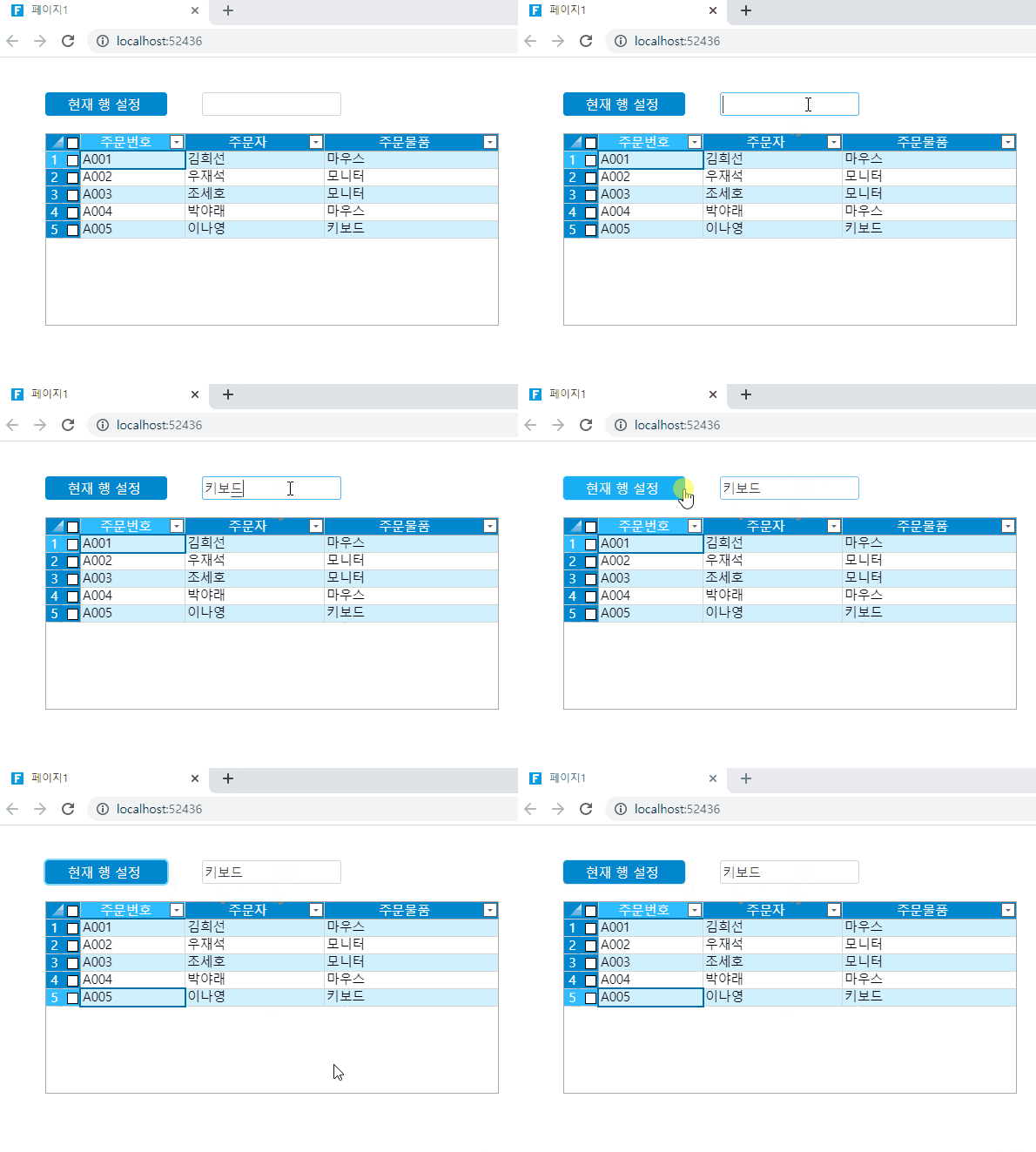
5. 실행을 한 후, 텍스트 박스에 셀을 입력한 후 "현재 행 설정"버튼을 클릭하면 리스트뷰에서 텍스트박스의 내용이 있는 행으로 이동하는 것을 확인할 수 있습니다.