# 비디오, 음원 파일 플레이어 (VideoPlayCellType)

VideoPlayCellType 플러그인을 이용하여 비디오를 재생하고, 음원 재생할 수 있습니다.

### 플러그인 다운로드&#x20;

버전에 맞는 플러그인을 다운로드 합니다.

<table><thead><tr><th width="139">버전 </th><th>다운로드 링크 </th></tr></thead><tbody><tr><td>v 9.0</td><td><a href="https://forguncy-korea.github.io/attached_files/Plugin_Files/V9_Plugin/VideoPlayCellType.zip">VideoPlayCellType.zip</a></td></tr><tr><td>v 7. 1</td><td><a href="https://forguncy-korea.github.io/attached_files/Plugin_Files/V7.1_Plugin_20211223/VideoPlayCellType.zip">VideoPlayCellType.zip</a></td></tr><tr><td>v 7. 0</td><td><a href="https://forguncy-korea.github.io/attached_files/Plugin_Files/V7_Plugin_20210722/VideoPlayCellType.zip">VideoPlayCellType.zip</a></td></tr><tr><td>v 6. 1</td><td><a href="https://forguncy-korea.github.io/attached_files/Plugin_Files/V6.1_Plugin_20201111/VideoPlayCellType.zip">VideoPlayCellType.zip</a></td></tr><tr><td>v 6. 0</td><td><a href="https://forguncy-korea.github.io/attached_files/Plugin_Files/V6_Plugin_20200903/VideoPlayCellType.zip">VideoPlayCellType.zip</a></td></tr><tr><td>v 5. 1</td><td><a href="https://forguncy-korea.github.io/attached_files/Plugin_Files/V5_Plugin_20191115/VideoPlayCellType.zip">VideoPlayCellType.zip</a></td></tr></tbody></table>

### 사용방법&#x20;

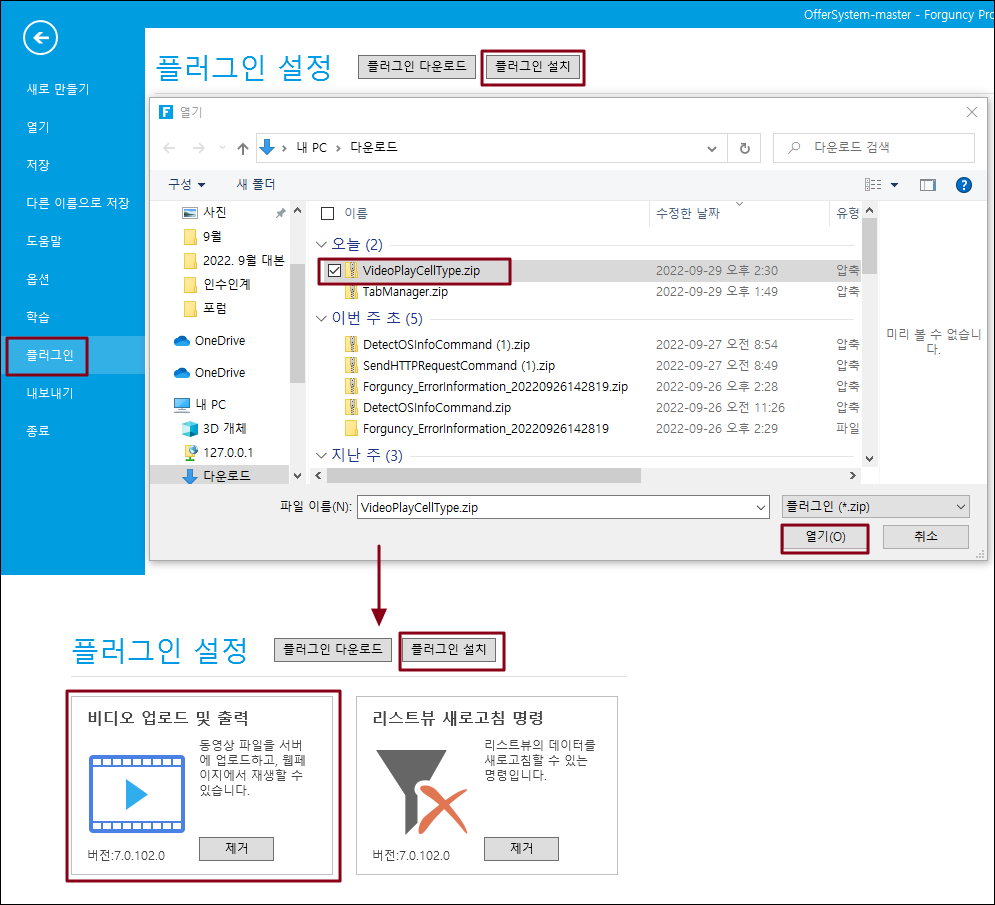
1. 플러그인을 다운로드합니다.
2. Forguncy Builder에서 설치하고 Forguncy Builder를 다시 실행합니다.
<figure><img src="https://1191936652-files.gitbook.io/~/files/v0/b/gitbook-x-prod.appspot.com/o/spaces%2FMDaEsmK9OwD7QYBNk9Sn%2Fuploads%2F1MvRJtzqLoyvsO1SrBdV%2Fimage.png?alt=media&#x26;token=e6922a30-496e-4f9d-99aa-f7d2bb1efff3" alt=""><figcaption></figcaption></figure>

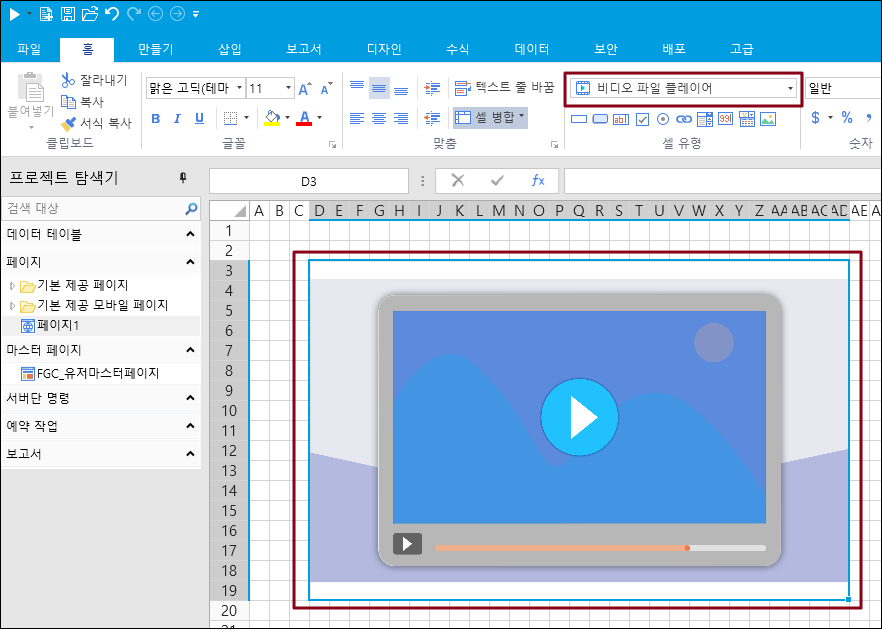
3\. 셀 영역을 선택하고, 셀 유형에서 "비디오 파일 플레이어"를 선택합니다.
<figure><img src="https://1191936652-files.gitbook.io/~/files/v0/b/gitbook-x-prod.appspot.com/o/spaces%2FMDaEsmK9OwD7QYBNk9Sn%2Fuploads%2FCypC1I5jBPi9GH4np3gb%2Fimage.png?alt=media&#x26;token=8116c43a-c990-45d2-ae76-5288355cbbef" alt=""><figcaption></figcaption></figure>

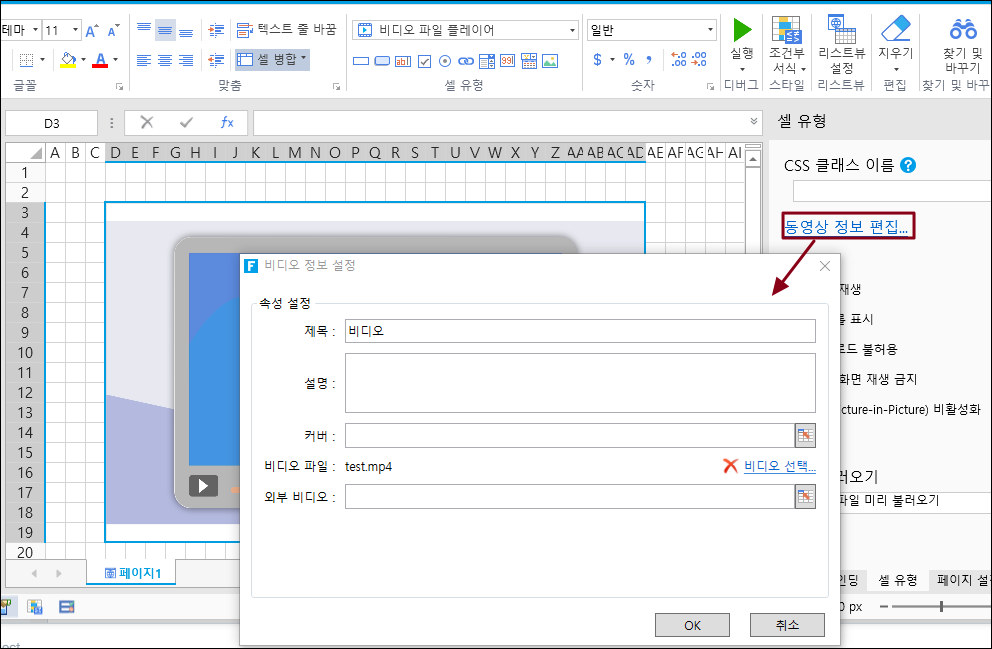
4\. 셀 영역을 선택한 후, "동영상 정보 편집"을 클릭합니다.

&#x20;   비디오 정보 설정에서 동영상의 제목, 설명, 파일등을 설정합니다.&#x20;

<figure><img src="https://1191936652-files.gitbook.io/~/files/v0/b/gitbook-x-prod.appspot.com/o/spaces%2FMDaEsmK9OwD7QYBNk9Sn%2Fuploads%2F7XXb3xz4Ohdbrpjv4sSu%2Fimage.png?alt=media&#x26;token=2852554d-acd3-416f-8802-cca5005101e3" alt=""><figcaption></figcaption></figure>

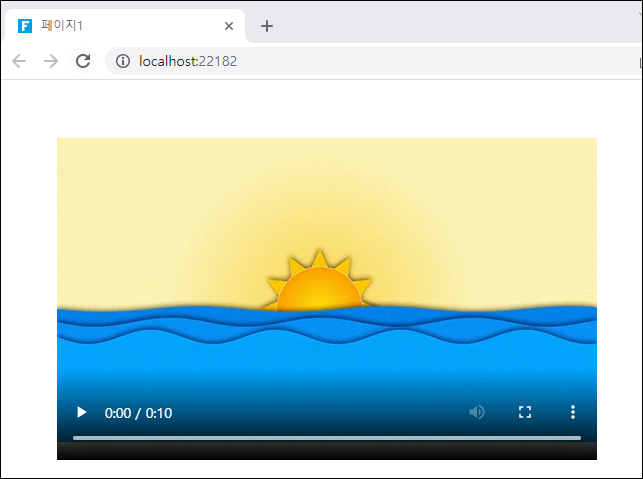
5\. 실행하면 아래와 같이 동영상이 보이는 것을 확인할 수 있습니다.

<figure><img src="https://1191936652-files.gitbook.io/~/files/v0/b/gitbook-x-prod.appspot.com/o/spaces%2FMDaEsmK9OwD7QYBNk9Sn%2Fuploads%2FAfHeQPmuIKW3UVDV8RFn%2Fimage.png?alt=media&#x26;token=e7f4c85c-47f4-4bfd-8a91-c02b2c197c18" alt=""><figcaption></figcaption></figure>