# ValueChanged 이벤트

#### ![](https://help.grapecity.com.cn/download/thumbnails/72364889/blue%20block.png?version=1\&modificationDate=1648092722000\&api=v2) 이벤트 <a href="#valuechanged-shi-jian-shi-jian" id="valuechanged-shi-jian-shi-jian"></a>

&#x20;  Forguncy.CellEvents.ValueChanged

#### ![](https://help.grapecity.com.cn/download/thumbnails/72364889/blue%20block.png?version=1\&modificationDate=1648092722000\&api=v2) 설명 <a href="#valuechanged-shi-jian-miao-shu" id="valuechanged-shi-jian-miao-shu"></a>

셀의 값이 변경될 때 이벤트가 트리거됩니다.

#### ![](https://help.grapecity.com.cn/download/thumbnails/72364889/blue%20block.png?version=1\&modificationDate=1648092722000\&api=v2) **반환값**  <a href="#valuechanged-shi-jian-fan-hui-zhi" id="valuechanged-shi-jian-fan-hui-zhi"></a>

문자열

#### ![](https://help.grapecity.com.cn/download/thumbnails/72364889/blue%20block.png?version=1\&modificationDate=1648092722000\&api=v2) 예제 <a href="#valuechanged-shi-jian-shi-li" id="valuechanged-shi-jian-shi-li"></a>

다음 예제 코드에서는 콤보 상자에 ValueChanged 이벤트를 추가하는 bind 메서드를 사용하여 셀 값이 변경될 때 경고 상자가 나타납니다.

```
 //CallBack으로 사용할 이벤트를 정의합니다.
  var valueChangedEvent  = function(arg) {
      alert("안녕하세요. Forguncy!");
  }
  
  //현재 페이지에 Namespace를 선언합니다.
  var page = Forguncy.Page;

  //Cell Name이 myCell이라고 되어 있는 셀 인스턴스 속성을 가져옵니다.
  var cell = page.getCell("myCell");

  //input 셀이 변경될 때 valueChangedEvent 이벤트를 binding합니다.
  cell.bind("valueChanged", valueChangedEvent);
```

#### Forguncy 사용 예제

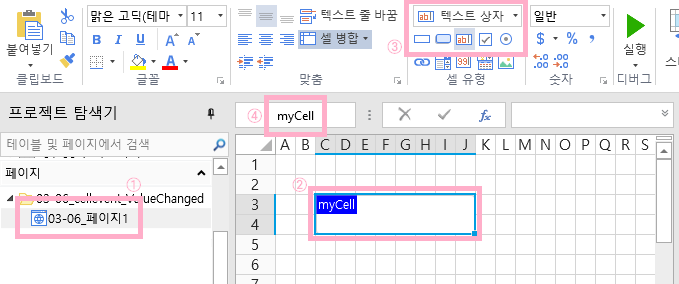
1. 페이지 한 개 생성하고, 텍스트 상자 셀을 생성합니다. 이후 왼쪽 상단의 Cell Name에 myCell이라고 입력합니다.<br>

   <figure><img src="https://forguncy-korea.github.io/images/forguncy5/ex-ss_cellevent-valuechanged01.png" alt=""><figcaption></figcaption></figure>
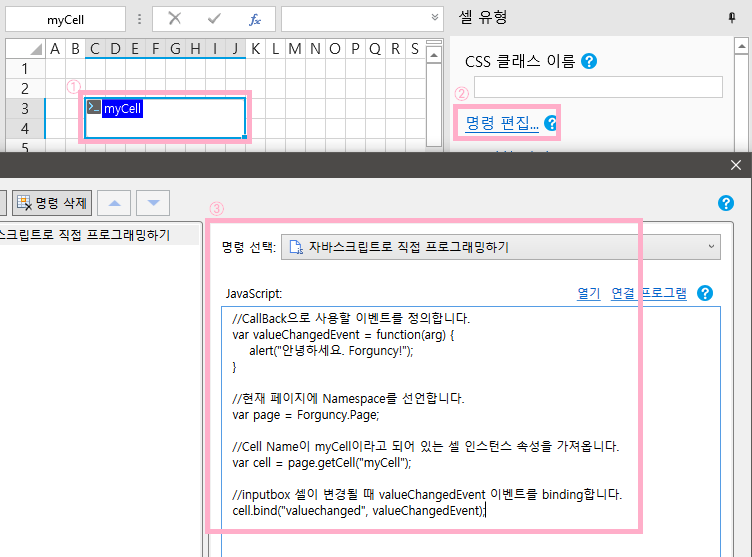
2. 텍스트 상자 셀을 클릭 후 ‘명령 편집’에서 “자바크스립트로 직접 프로그래밍하기” 명령을 추가하여, 코드를 입력합니다.<br>

   <figure><img src="https://forguncy-korea.github.io/images/forguncy5/ex-ss_cellevent-valuechanged02.png" alt=""><figcaption></figcaption></figure>
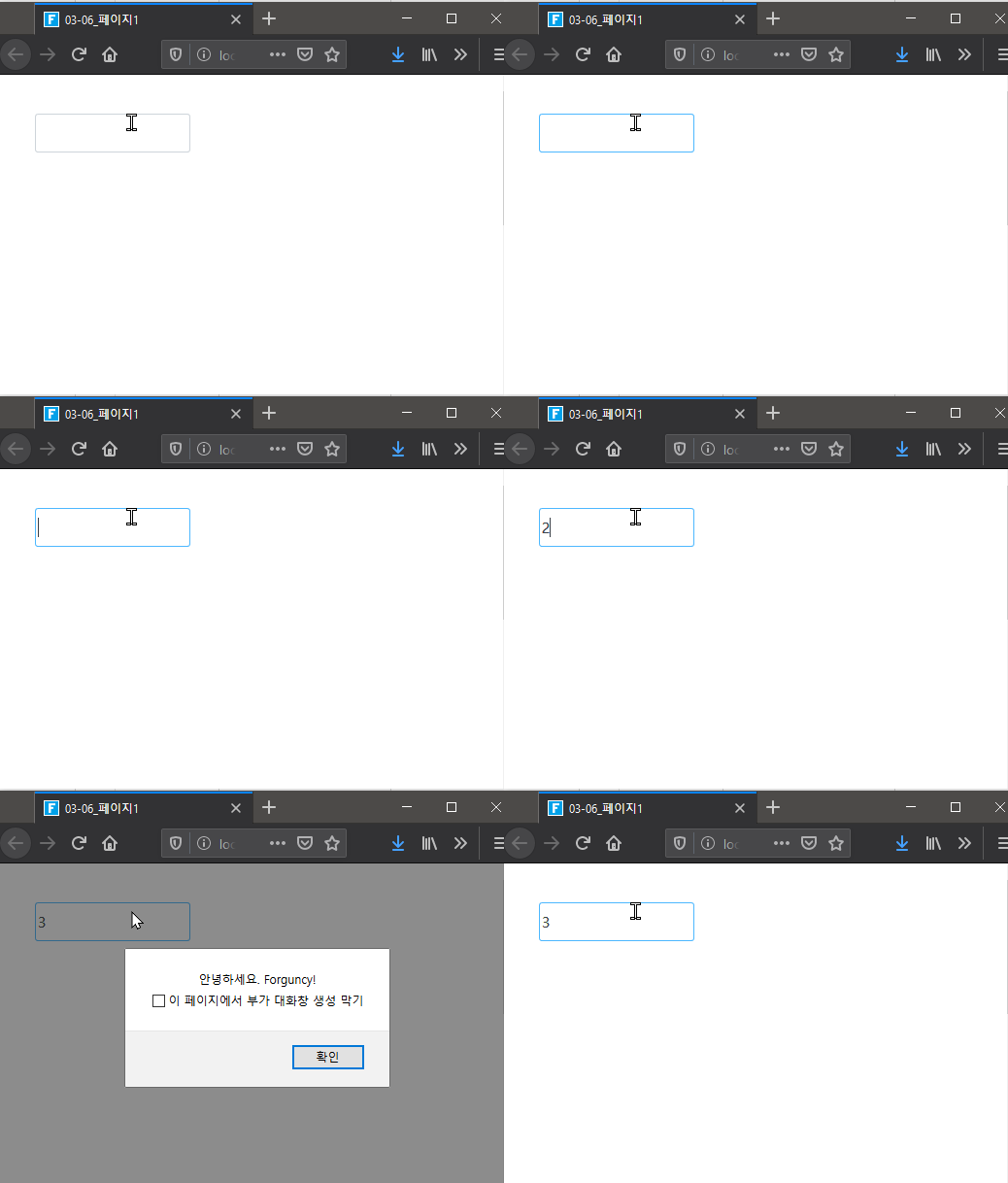
3. 해당 프로젝트를 실행하여 나타나는 텍스트 상자에 값을 입력 후 엔터키를 누릅니다. 이후 값을 변경한 후 다시 엔터키를 누르면 경고창이 나타납니다.
   ![](https://forguncy-korea.github.io/images/forguncy5/ex-ss_cellevent-valuechanged03.gif)

   이벤트가 중첩되어 실행되는 것은 JavaScript 라이브러리의 이슈입니다. 실제 구현하실 때는 이를 고려하셔서 구현해 주세요.