# enable 메서드

#### 메서드 <a href="#enable-fang-fa-fang-fa" id="enable-fang-fa-fang-fa"></a>

Cell.enable()

#### 설명 <a href="#enable-fang-fa-miao-shu" id="enable-fang-fa-miao-shu"></a>

셀을 활성화합니다. 셀을 사용하지 않도록 설정하면 클릭할 수 없습니다.

#### **매개 변수** <a href="#enable-fang-fa-can-shu-shuo-ming" id="enable-fang-fa-can-shu-shuo-ming"></a>

없음&#x20;

#### **반환값**  <a href="#enable-fang-fa-fan-hui-zhi" id="enable-fang-fa-fan-hui-zhi"></a>

없음&#x20;

#### 예제 <a href="#enable-fang-fa-shi-li" id="enable-fang-fa-shi-li"></a>

다음 예제 코드에서 enable 메서드를 사용하여 버튼을 클릭 하 여 사용 하지 않도록 설정 된 지정 된 하이퍼링크를 사용 하도록 설정 합니다.

```
//현재 페이지 가져오기
var page = Forguncy.Page;
//현재 페이지에서 하이퍼링크라는 이름의 하이퍼링크를 가져옵니다.
var cell = page.getCell("hyperlink");
//하이퍼링크 활성화
cell.enable();
```

#### Forguncy 사용 예제

※참고 : disable과 enable은 한 세트이므로 같은 예제가 구성되어 있습니다.

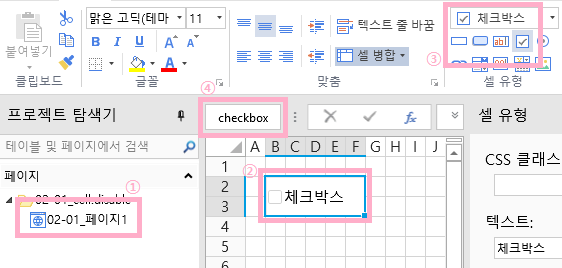
1. 페이지를 한 개 생성하고, 체크박스 셀을 하나 생성합니다. 이후 좌측상단의 Cell Name에 checkbox라고 입력해 줍니다.<br>

<figure><img src="https://forguncy-korea.github.io/images/forguncy5/ex-ss_cell-disable01.png" alt=""><figcaption></figcaption></figure>

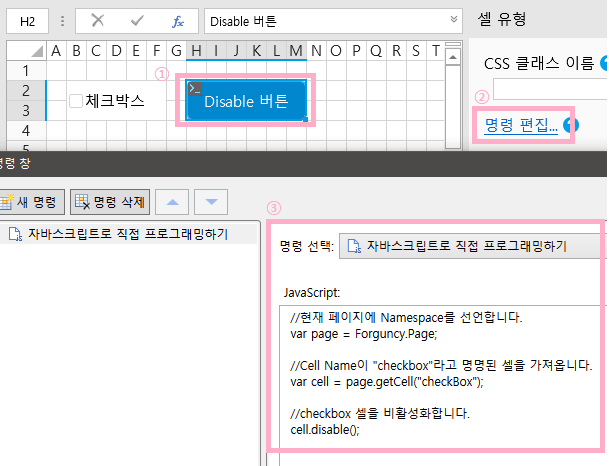
2\. 버튼을 생성하여 아래와 같이 “자바스크립트로 직접 프로그래밍하기” 명령을 생성하고, 코드를 입력합니다.<br>

<figure><img src="https://forguncy-korea.github.io/images/forguncy5/ex-ss_cell-disable02.png" alt=""><figcaption></figcaption></figure>

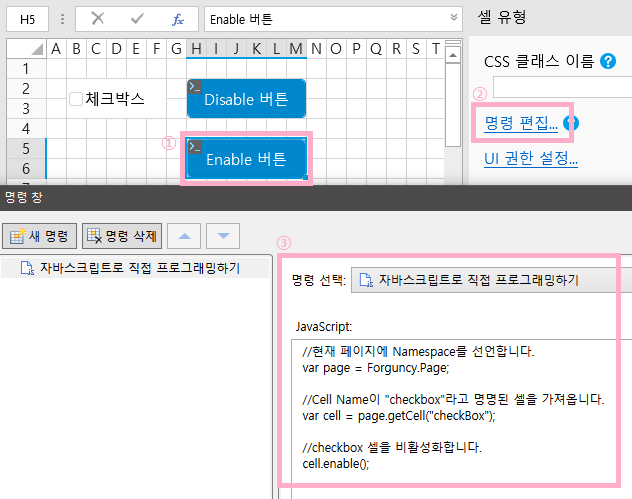
3\. 또 다른 버튼을 하나 추가로 생성하여 아래와 같이 “자바스크립트로 직접 프로그래밍하기” 명령을 생성하고, 코드를 입력합니다.<br>

<figure><img src="https://forguncy-korea.github.io/images/forguncy5/ex-ss_cell-disable03.png" alt=""><figcaption></figcaption></figure>

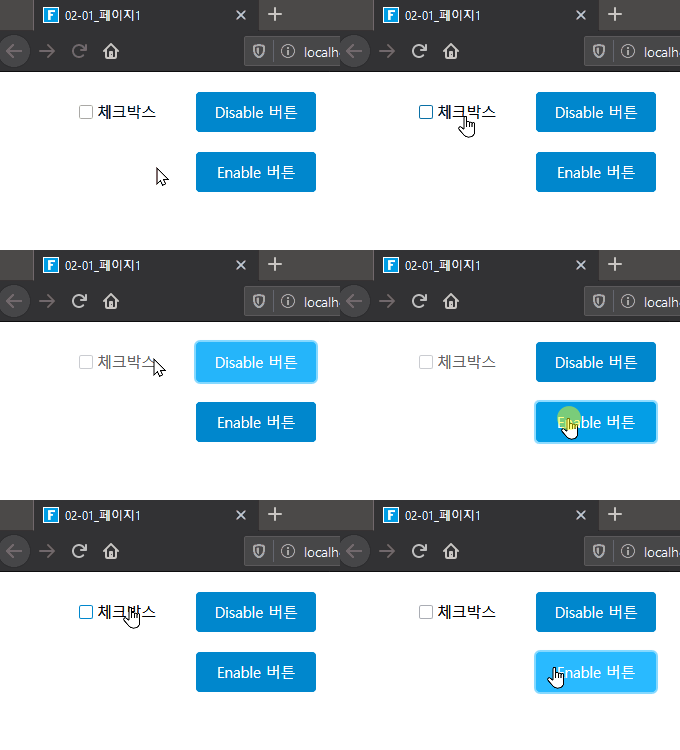
4\. 해당 프로젝트를 실행하고 체크박스를 클릭할 수 있는 지 확인합니다.\
Disable 버튼을 클릭하면 체크박스가 회색으로 변경되며, 클릭이 불가능하게 변경됩니다.\
Enable 버튼을 클릭하면 체크박스가 다시 클릭 가능한 상태로 변경됩니다.
![](https://forguncy-korea.github.io/images/forguncy5/ex-ss_cell-disable04.gif)


---

# Agent Instructions: Querying This Documentation

If you need additional information that is not directly available in this page, you can query the documentation dynamically by asking a question.

Perform an HTTP GET request on the current page URL with the `ask` query parameter:

```
GET https://doc.forguncy.co.kr/forguncy-v9/command/javascriptprogramming/javascript-api/class/cellclass/enable.md?ask=<question>
```

The question should be specific, self-contained, and written in natural language.
The response will contain a direct answer to the question and relevant excerpts and sources from the documentation.

Use this mechanism when the answer is not explicitly present in the current page, you need clarification or additional context, or you want to retrieve related documentation sections.