- Forguncy | 포건시
- 시작하기
- 데이터베이스
- 페이지&데이터 바인딩
- 웹페이지 구성
-
명령 및 동작
- 명령
- 서버단 명령
- 재사용 명령
- 예약 작업
- 워크플로우
- 로컬 실행 및 디버깅
-
자바 스크립트 프로그래밍
- CSS 사용하기
- JavaScript 사용
- 작업 페이지
- 작업 셀
- 작업 리스트뷰
- JavaScript 및 CSS 코드 디버그
-
JavaScript API 인덱스
- Forguncy 인터페이스
-
Forguncy 매서드
- addTableData 메서드
- addUserToRole 메서드
- addUser 메서드
- ConvertDateToOADate 메서드
- ConvertOADateToDate 메서드
- ConvertToCssColor 메서드
- deleteTableData 메서드
- deleteUserFromRole 메서드
- deleteUser메서드
- forceSyncTableData 메서드
- getTableDataByCondition 메서드
- getTableDataByOData 메서드
- getTableData 메서드
- logIn 메서드
- logOut 메서드
- modifyTablesData 메서드
- SendMail 메서드
- updateTableData 메서드
- Forguncy 열거형
- Forguncy 클래스
- 다국어
- 배포 및 권한
- 포건시 서버
- 공동작업
- 플러그인
ConvertDateToOADate 메서드
메서드
Forguncy.ConvertDateToOADate(date)
설명
이 메서드를 사용하여 DateTime을 OADate로 변환 합니다.
매개 변수
| 매개변수 | 형식 | 설명 |
|---|---|---|
| date | Date | 날짜 |
반환값
number, 날짜에서 OADate로 변환합니다.
예제
//날짜 가져오기
var date = new Date();
//DateTime을 OADate로 변환
var oaDate = Forguncy.ConvertDateToOADate(date);
// 경고 상자 팝업, OADate 표시
alert(oaDate);
사용 예제
- 페이지에서 셀 범위를 선택하고 셀 유형을 단추로 설정하고 명령을 [JavaScript 명령]으로 편집하고 JavaScript 코드를 입력합니다.
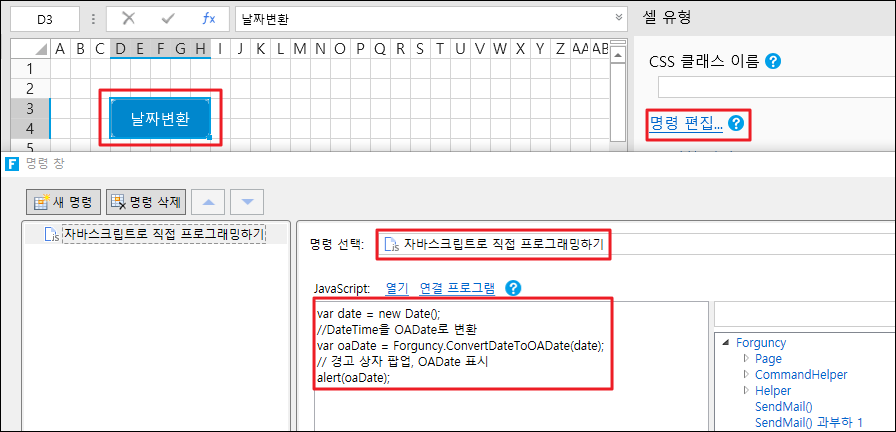
- 편집이 완료되면 [확인]을 클릭하여 대화 상자를 닫습니다.
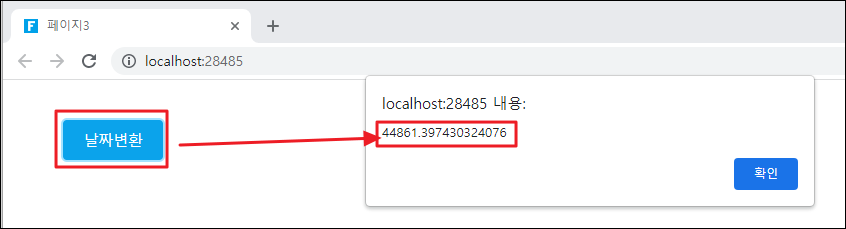
페이지를 실행하고 페이지에서 날짜 변환 버튼을 클릭하면 변환된 OADate를 표시하는 경고 상자가 나타납니다.